> ## Documentation Index
> Fetch the complete documentation index at: https://docs.getthread.com/llms.txt
> Use this file to discover all available pages before exploring further.
# How to Use the Slack Companion App for Service Teams
> Walk-through video showing service teams how to use the Thread Slack companion app to manage tickets, reply to threads, and collaborate on customer support.
## Overview
The Thread Slack Companion App brings your service desk into Slack, so technicians can see
and act on tickets without leaving the channels they already work in — reading threads,
replying to customers, and collaborating with teammates in one place.
## Watch the walkthrough
## What the walkthrough covers
* Viewing your assigned and team tickets from inside Slack
* Replying to a customer thread and adding internal notes
* Updating a ticket's status, priority, and assignment
* Collaborating with teammates on a ticket in-channel
## Frequently asked questions
That truncation is coming from Slack's message preview, not from Thread or the note itself.
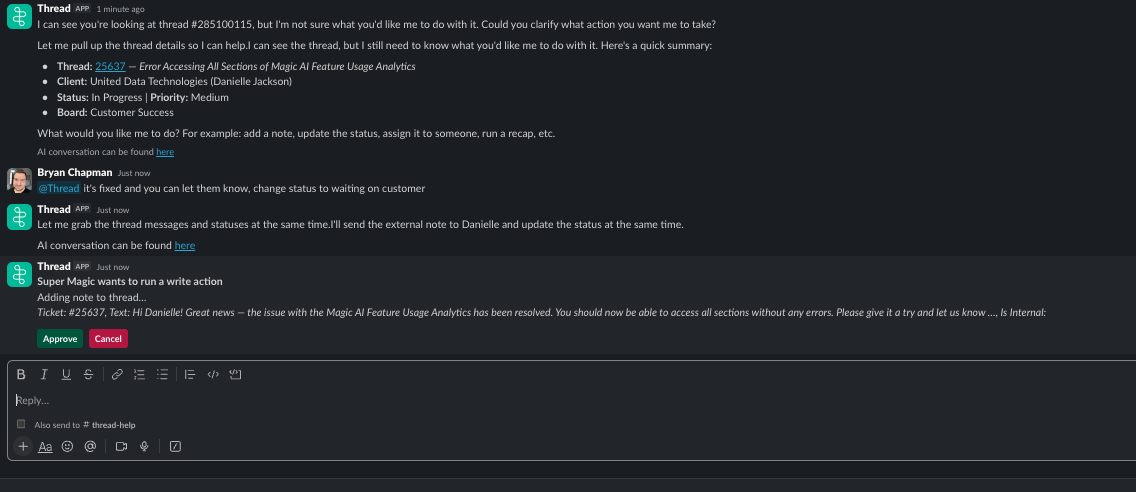 When Thread displays the confirmation prompt for a write action in Slack, it shows a preview of the note text. Slack truncates long text in those UI components (typically around 150–300 characters depending on the block type used). The actual note that gets added to the thread contains the full, untruncated text. The `...` is just Slack cutting off the preview display.
If you want to verify the full note content before confirming, ask Thread to show you the complete text first. Reply **"show me the full note"** and Thread will paste it out in full so you can review it before approving the action.
This is a Slack platform limitation and can't be changed from the Thread side. Slack enforces a maximum character count on text displayed inside its interactive message components, and there is no setting in Thread or Slack to override it.
## Related
Control whether external notes, internal notes, and activity logs are posted to Slack.
## Related topics
- [How Notifications Work for your Team](/notifications/how-will-notifications-work-internally.md)
- [Notifications & what customers see](/start-here/roles/technician/notifications-and-customers.md)
- [How to Roll Out the Teams Service App to Specific Users](/messenger/how-to-roll-out-the-teams-service-app-to-specific-users.md)
When Thread displays the confirmation prompt for a write action in Slack, it shows a preview of the note text. Slack truncates long text in those UI components (typically around 150–300 characters depending on the block type used). The actual note that gets added to the thread contains the full, untruncated text. The `...` is just Slack cutting off the preview display.
If you want to verify the full note content before confirming, ask Thread to show you the complete text first. Reply **"show me the full note"** and Thread will paste it out in full so you can review it before approving the action.
This is a Slack platform limitation and can't be changed from the Thread side. Slack enforces a maximum character count on text displayed inside its interactive message components, and there is no setting in Thread or Slack to override it.
## Related
Control whether external notes, internal notes, and activity logs are posted to Slack.
## Related topics
- [How Notifications Work for your Team](/notifications/how-will-notifications-work-internally.md)
- [Notifications & what customers see](/start-here/roles/technician/notifications-and-customers.md)
- [How to Roll Out the Teams Service App to Specific Users](/messenger/how-to-roll-out-the-teams-service-app-to-specific-users.md)