> ## Documentation Index
> Fetch the complete documentation index at: https://docs.getthread.com/llms.txt
> Use this file to discover all available pages before exploring further.
# Create an Email Signature Using Thread Snippets
> Build a reusable email signature in Thread snippets using rich text formatting, embedded website links, and markdown image syntax for a signature photo.
## Overview
Adding your email signate to a snippet involves embedded links as well as some markdown in the case of any pictures included in your signature.
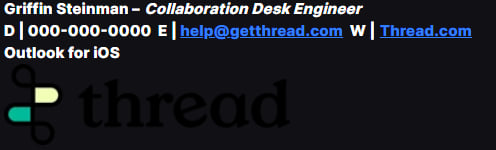
Let's take this email signature for example
 ## Format and link your text
To create this signature, you would use plaintext and change the style of the text to bold and italicized using the built-in text editor.
You can then embed your website link to whatever text you have in your signature.
## Add your signature photo
Now for the tricky part - the photo.
To add the photo at the end, you use markdown along with an image link.
``
Add that in to the bottom and replace your image link so that the snippet looks like this
## Format and link your text
To create this signature, you would use plaintext and change the style of the text to bold and italicized using the built-in text editor.
You can then embed your website link to whatever text you have in your signature.
## Add your signature photo
Now for the tricky part - the photo.
To add the photo at the end, you use markdown along with an image link.
``
Add that in to the bottom and replace your image link so that the snippet looks like this
 Then you are all set!
## Related topics
- [Day-one setup](/start-here/roles/technician/day-one-setup.md)
- [Set Up a SmileBack CSAT Survey with Snippets](/inbox/how-to-setup-a-csat-survey.md)
- [Add a Chat Now Button to PSA Ticket Emails](/messenger/add-chat-now-button-email.md)
Then you are all set!
## Related topics
- [Day-one setup](/start-here/roles/technician/day-one-setup.md)
- [Set Up a SmileBack CSAT Survey with Snippets](/inbox/how-to-setup-a-csat-survey.md)
- [Add a Chat Now Button to PSA Ticket Emails](/messenger/add-chat-now-button-email.md)