> ## Documentation Index
> Fetch the complete documentation index at: https://docs.getthread.com/llms.txt
> Use this file to discover all available pages before exploring further.
# Manage PSA Board Visibility and Exclusions in Thread
> Use board checkboxes to control which PSA boards sync into Thread, hide irrelevant tickets from views and webhooks, and re-enable boards when needed.
## **Boards & Categories Sync Management**
## **Concept**
Every PSA board connected to Thread has a **checkbox** that controls whether that board is synced and visible across the platform. When a checkbox is unchecked, Thread stops syncing that board, hides it from all dropdowns and filters, and silently drops any inbound webhook events for tickets on that board. When checkbox is checked, syncing resumes, the board reappears throughout the interface, and new ticket updates begin flowing in again.
| Area | Board Excluded (Toggle OFF) | Board Re-Included (Toggle ON) |
| ---------------- | --------------------------------------------------------------------------- | ------------------------------------------------------------------------------------------------------ |
| Views | A hidden filter rule is applied — tickets from the board no longer surface. | The hidden filter rule is removed; tickets surface again naturally after ticket updates from the PSA. |
| Webhooks | Webhook events for that board are silently dropped. | Webhooks resume, but events that fired during the exclusion window are not retroactively replayed. |
| PSA Sync | Board data stops syncing to Thread. | Board data resumes syncing on the next daily sync (12:00 AM EST) or on-demand via Force Sync . |
| Existing Filters | Filters that explicitly reference the board are not auto-cleaned. | The board becomes available again, but previously removed filter references must be re-added manually. |
**Important:** Excluding a board does **not** update existing filters automatically. If the board was referenced in Assistive AI managed access rules or any explicit filter, those must be cleaned up manually.
Exclude boards that aren't relevant to your team's workflow so agents only see actionable tickets in Thread. Re-including a board restores visibility with no permanent data loss.
### **How To**
**Enable or Disable a Board**
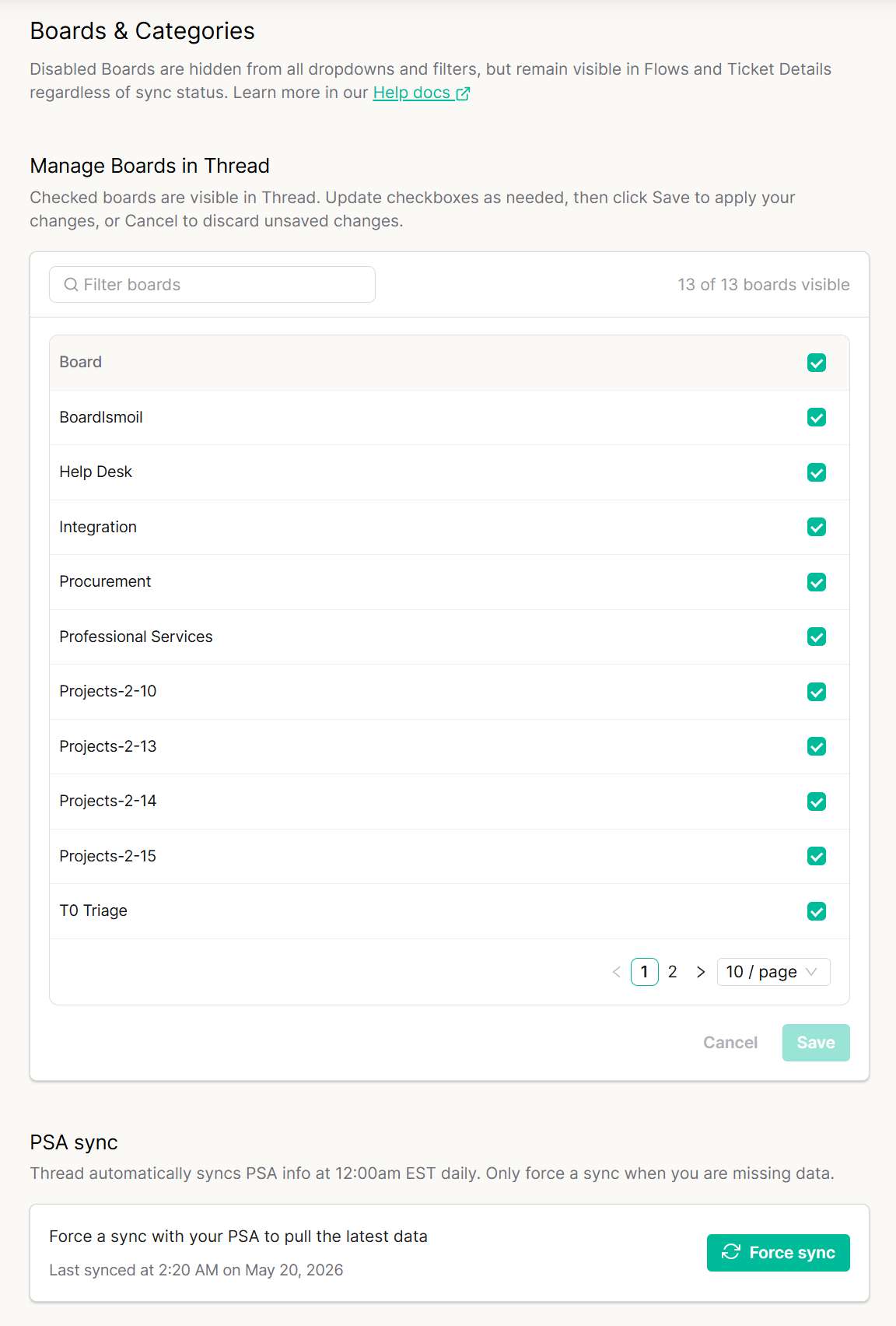
Navigate to **Integrations → PSA → PSA Sync → Manage Sync** for Boards & Categories.
Locate the board using the **Filter boards** search bar, or scroll through the paginated list.
* **Green Checkmark**— Board is synced and visible in Thread.
* **No Checkmark** — Board is excluded from sync and hidden from dropdowns and filters. For Partners using Autotask, do not exclude the Merged Ticket Queue as it will cause merged tickets to be orphaned
Click Save
Refresh (**F5**) Inbox Web or re-login Inbox Desktop for Views to update. All users need to refresh or re-login to the platform for view filters to update
 **Restore Tickets Immediately After Re-Including a Board**
Because webhook events fired during the exclusion window were silently dropped, tickets updated while the board was off won't appear on their own until the next update. To force all tickets back into Thread right away:
Open your **PSA**.
Select **ALL tickets** on the re-included board.
**Save** them (a bulk save triggers Thread to pick up each ticket).
All threads will now be visible in Thread immediately.
**Force Sync Board Data On-Demand**
Thread automatically syncs board data from your PSA daily at **12:00 AM EST**. If you've recently added or modified boards in your PSA and don't see them reflected:
Go to the **Boards & Categories** settings page.
Click the **Force Sync** button to pull the latest data immediately.
Check the **Last synced** timestamp beneath the button to confirm the sync completed.
See **Integrations** updates in the [changelog](/changelog/q3-2026).
## Related topics
- [PSA Note Visibility Rules](/skill-library/psa-specific/psa-note-visibility-rules.md)
- [PSA Closed Status Taxonomy](/skill-library/psa-specific/psa-closed-status-taxonomy.md)
- [Log emoji reactions in PSA](/integrations/log-emoji-reactions-in-psa.md)
**Restore Tickets Immediately After Re-Including a Board**
Because webhook events fired during the exclusion window were silently dropped, tickets updated while the board was off won't appear on their own until the next update. To force all tickets back into Thread right away:
Open your **PSA**.
Select **ALL tickets** on the re-included board.
**Save** them (a bulk save triggers Thread to pick up each ticket).
All threads will now be visible in Thread immediately.
**Force Sync Board Data On-Demand**
Thread automatically syncs board data from your PSA daily at **12:00 AM EST**. If you've recently added or modified boards in your PSA and don't see them reflected:
Go to the **Boards & Categories** settings page.
Click the **Force Sync** button to pull the latest data immediately.
Check the **Last synced** timestamp beneath the button to confirm the sync completed.
See **Integrations** updates in the [changelog](/changelog/q3-2026).
## Related topics
- [PSA Note Visibility Rules](/skill-library/psa-specific/psa-note-visibility-rules.md)
- [PSA Closed Status Taxonomy](/skill-library/psa-specific/psa-closed-status-taxonomy.md)
- [Log emoji reactions in PSA](/integrations/log-emoji-reactions-in-psa.md)