> ## Documentation Index
> Fetch the complete documentation index at: https://docs.getthread.com/llms.txt
> Use this file to discover all available pages before exploring further.
# Turn Off End-User Notifications for Autotask Time Entry Summary Notes
> Stop Summary Notes saved on Autotask time entries from being sent to end users in Messenger, Teams, or Slack with the Notifications toggle in the Autotask integration settings.
By default, when a technician saves a time entry with a Summary Note in Autotask, Thread treats the Summary Note as an external note. Thread posts it to the ticket's thread, so the end user sees it in Messenger, Teams, or Slack, and it appears in the conversation in Thread Inbox.
Many Autotask partners keep billing detail in the Summary Notes field because internal notes don't appear on Autotask invoices. If that's your process, turn this setting off so your Summary Notes stay out of your clients' chat apps without changing how you enter time in Autotask.
## Prerequisites
* You're an Admin in your Thread workspace.
* Your workspace uses the Autotask integration.
The **Notifications** section only appears on Autotask workspaces. If you don't see it, check with your Customer Success contact.
## Turn off the notifications
In the [Thread admin panel](https://admin.getthread.com), go to **Integrations**, select **Autotask**, then open the **Settings** tab.
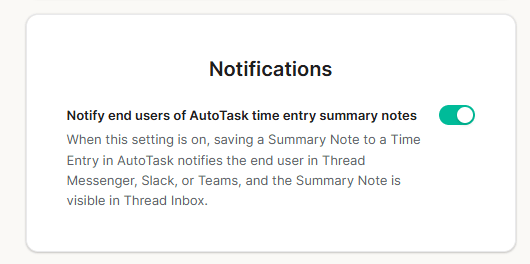
Scroll to the **Notifications** section at the bottom of the page.
Turn off **Notify end users of AutoTask time entry summary notes**. The change saves immediately; there is no separate save button.
 ## What changes when the toggle is off
* Summary Notes saved on time entries in Autotask are no longer posted to the ticket's thread. End users don't get a Messenger, Teams, or Slack message, and the note doesn't appear in the conversation.
* The Summary Note itself is untouched in Autotask, so it still appears on your invoices and in the Autotask ticket as usual.
* Internal notes on Autotask time entries behave the same as before.
* Time entries saved from TimePad in Thread Inbox are not affected. The [external and internal entry options](/inbox/track-your-time-with-timepad) work as usual.
The setting applies to every Autotask time entry Summary Note in the workspace. It can't be set per note, per ticket, or per client. When the toggle is off and you do want the end user to see an update, send it as an external reply from Thread Inbox.
## Related topics
- [Set Up an Autotask Email Workflow for Thread Chats](/integrations/setting-up-an-email-communication-workflow-in-autotask.md)
- [Workspace Defaults: Time Zone and TimePad Settings](/inbox/workspace.md)
- [Track your time with TimePad](/inbox/track-your-time-with-timepad.md)
## What changes when the toggle is off
* Summary Notes saved on time entries in Autotask are no longer posted to the ticket's thread. End users don't get a Messenger, Teams, or Slack message, and the note doesn't appear in the conversation.
* The Summary Note itself is untouched in Autotask, so it still appears on your invoices and in the Autotask ticket as usual.
* Internal notes on Autotask time entries behave the same as before.
* Time entries saved from TimePad in Thread Inbox are not affected. The [external and internal entry options](/inbox/track-your-time-with-timepad) work as usual.
The setting applies to every Autotask time entry Summary Note in the workspace. It can't be set per note, per ticket, or per client. When the toggle is off and you do want the end user to see an update, send it as an external reply from Thread Inbox.
## Related topics
- [Set Up an Autotask Email Workflow for Thread Chats](/integrations/setting-up-an-email-communication-workflow-in-autotask.md)
- [Workspace Defaults: Time Zone and TimePad Settings](/inbox/workspace.md)
- [Track your time with TimePad](/inbox/track-your-time-with-timepad.md)