> ## Documentation Index
> Fetch the complete documentation index at: https://docs.getthread.com/llms.txt
> Use this file to discover all available pages before exploring further.
# Create your workspace
> Create your Thread workspace and connect your PSA: setup link, email verification, branding, and the ticketing integration that starts ticket flow.
export const SidebarProgress = ({signals = {}}) => {
useEffect(() => {
const KEY = "thread-onboarding-completed";
const TEAL = "#00B398";
const DONE_ICON = '';
const STAGES = [{
slug: "set-up-your-workspace",
steps: ["create-your-workspace", "configure-microsoft-sso", "configure-status-mapping", "optimize-notifications"]
}, {
slug: "turn-on-assistive-ai",
steps: ["auto-prioritization", "auto-categorization", "auto-title", "magic-sentiment", "client-intelligence", "enable-super-magic", "auto-routing-flows"]
}, {
slug: "deploy-chat",
steps: ["configure-messenger", "create-teams-app", "deploy-messenger"]
}, {
slug: "tune-ai",
steps: ["magic-analytics", "super-magic-deep-dive", "announce-thread"]
}, {
slug: "equip-technicians",
steps: ["inbox-views", "inbox-teams", "companion-app"]
}, {
slug: "run-a-pilot",
steps: ["enablement-playbook", "technician-ritual"]
}, {
slug: "deploy-magic-agents",
steps: ["triage-agent", "reminder-agent", "triage-agent-guide", "intent-creation"]
}, {
slug: "launch-to-clients",
steps: ["marketing-assets", "communicate-rollout", "value-messaging"]
}, {
slug: "add-voice-ai",
steps: ["voice-ai-config", "voice-overflow", "voice-auto-attendant"]
}, {
slug: "ai-service-unleashed",
steps: ["review-analytics", "leadership-ritual"]
}];
const STAGE_SLUGS = new Set(STAGES.map(s => s.slug));
const readLocal = () => {
try {
return JSON.parse(localStorage.getItem(KEY) || "[]");
} catch (e) {
return [];
}
};
const isDone = (done, slug) => done.includes(slug) || !!(signals && signals[slug]);
const decorate = () => {
const done = readLocal();
const scope = document.getElementById("sidebar-content") || document;
const links = [...scope.querySelectorAll('a[href*="/onboarding/"]')].filter(a => !a.closest("main"));
links.forEach(a => {
const m = (a.getAttribute("href") || "").match(/\/onboarding\/([^/?#]+)/);
if (!m) return;
const slug = m[1];
if (STAGE_SLUGS.has(slug)) return;
const d = isDone(done, slug);
const has = a.querySelector(".thread-oc-check");
if (d && !has) {
const s = document.createElement("span");
s.className = "thread-oc-check";
s.textContent = "✓ ";
s.style.color = TEAL;
s.style.fontWeight = "700";
a.insertBefore(s, a.firstChild);
} else if (!d && has) {
has.remove();
}
});
let nextMarked = false;
STAGES.forEach(stage => {
const li = scope.querySelector('li[id="/onboarding/' + stage.slug + '"]');
if (!li) return;
const row = li.querySelector(":scope > button") || li.querySelector(":scope > a") || li.firstElementChild;
if (!row) return;
const iconSvg = row.querySelector('svg[style*="mask"]');
const iconWrap = iconSvg ? iconSvg.parentElement : null;
const nameSpan = [...row.querySelectorAll("span")].find(s => s.textContent.trim() && !s.classList.contains("thread-oc-check"));
const allDone = stage.steps.length > 0 && stage.steps.every(s => isDone(done, s));
const isNext = !allDone && !nextMarked;
if (isNext) nextMarked = true;
if (iconWrap) {
const injected = iconWrap.querySelector(".thread-oc-doneicon");
if (allDone) {
if (iconSvg) iconSvg.style.display = "none";
if (!injected) iconWrap.insertAdjacentHTML("beforeend", DONE_ICON);
} else {
if (injected) injected.remove();
if (iconSvg) iconSvg.style.display = "";
}
}
if (iconSvg && !allDone) iconSvg.style.backgroundColor = isNext ? TEAL : "";
if (nameSpan) {
nameSpan.style.color = isNext ? TEAL : "";
nameSpan.style.fontWeight = isNext ? "600" : "";
}
});
};
decorate();
const iv = setInterval(decorate, 600);
window.addEventListener("thread-onboarding-updated", decorate);
window.addEventListener("storage", decorate);
return () => {
clearInterval(iv);
window.removeEventListener("thread-onboarding-updated", decorate);
window.removeEventListener("storage", decorate);
};
}, [signals]);
return null;
};
export const MarkComplete = ({id, signalDone = false}) => {
const KEY = "thread-onboarding-completed";
const read = () => {
try {
return JSON.parse(localStorage.getItem(KEY) || "[]");
} catch (e) {
return [];
}
};
const [localDone, setLocalDone] = useState(false);
const done = signalDone || localDone;
useEffect(() => {
const sync = () => setLocalDone(read().includes(id));
sync();
window.addEventListener("thread-onboarding-updated", sync);
return () => window.removeEventListener("thread-onboarding-updated", sync);
}, [id]);
const toggle = () => {
if (signalDone) return;
const list = read();
const next = list.includes(id) ? list.filter(x => x !== id) : [...list, id];
try {
localStorage.setItem(KEY, JSON.stringify(next));
} catch (e) {}
setLocalDone(next.includes(id));
window.dispatchEvent(new Event("thread-onboarding-updated"));
};
return ;
};
Stand up your Thread workspace and connect your PSA so tickets start flowing in. This is the
foundation everything else in the onboarding plan builds on.
## Create your Thread workspace
You only need one workspace per company, so decide who will complete this step.
Navigate to the Thread workspace **setup link** provided by your Customer Success Manager, or as outlined in your Thread onboarding plan.
Enter your email and click **Submit**.
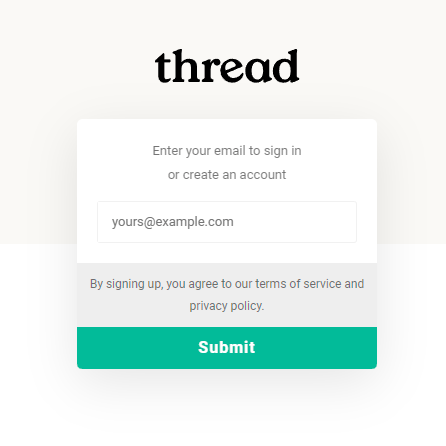 Enter the one-time passcode sent to your email and click **Submit**.
Enter your **Full name**, **Workspace name**, and **upload your logo**. If you don't have your company logo ready, you can use the default "Thread" logo for now and change it later from the Thread Admin Panel once your workspace is set up.
Enter the one-time passcode sent to your email and click **Submit**.
Enter your **Full name**, **Workspace name**, and **upload your logo**. If you don't have your company logo ready, you can use the default "Thread" logo for now and change it later from the Thread Admin Panel once your workspace is set up.
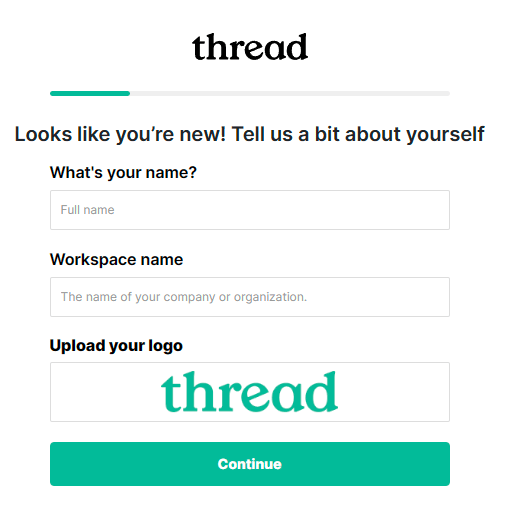 Once you're finished, click **Continue**.
## Connect your ticketing system
Thread integrates with your PSA so your tickets, companies, and contacts flow in through a deep, bi-directional integration.
Choose the ticketing system you want to integrate with Thread.
Once you're finished, click **Continue**.
## Connect your ticketing system
Thread integrates with your PSA so your tickets, companies, and contacts flow in through a deep, bi-directional integration.
Choose the ticketing system you want to integrate with Thread.
 Follow the setup guide for your PSA:
* [Set up the Autotask ticketing integration](/integrations/creating-a-autotask-api-user)
* [Set up the ConnectWise PSA ticketing integration](/integrations/creating-a-connect-wise-manage-api-user)
* [Set up the HaloPSA ticketing integration](/integrations/how-to-setup-halo-psa-integration)
Once your PSA is connected, continue through the rest of this stage — configure SSO, map your statuses, and tune notifications — using the lessons in the sidebar.
## Related topics
- [Thread Partner Change Management Guide](/get-started/thread-partner-change-management-guide.md)
- [Set Up the HaloPSA Ticketing Integration](/integrations/how-to-setup-halo-psa-integration.md)
- [Create your first Voice AI agent](/ai-agents/voice-ai-setup-phase-1-initial-configuration.md)
Follow the setup guide for your PSA:
* [Set up the Autotask ticketing integration](/integrations/creating-a-autotask-api-user)
* [Set up the ConnectWise PSA ticketing integration](/integrations/creating-a-connect-wise-manage-api-user)
* [Set up the HaloPSA ticketing integration](/integrations/how-to-setup-halo-psa-integration)
Once your PSA is connected, continue through the rest of this stage — configure SSO, map your statuses, and tune notifications — using the lessons in the sidebar.
## Related topics
- [Thread Partner Change Management Guide](/get-started/thread-partner-change-management-guide.md)
- [Set Up the HaloPSA Ticketing Integration](/integrations/how-to-setup-halo-psa-integration.md)
- [Create your first Voice AI agent](/ai-agents/voice-ai-setup-phase-1-initial-configuration.md)