> ## Documentation Index
> Fetch the complete documentation index at: https://docs.getthread.com/llms.txt
> Use this file to discover all available pages before exploring further.
# Microsoft Teams App Permissions Reference
> Reference for the Microsoft Graph permissions Thread requests in Entra ID for Teams Service and Companion apps, covering delegated, application, and SSO scopes.
## Microsoft Teams App Permissions
### Concept
Thread installs a single enterprise application in Microsoft Entra ID to power all Teams and SSO functionality. Admin consent is required once during onboarding. Thread uses **Delegated** permissions during initial setup and **Application** permissions for ongoing operations, ensuring users are never prompted for permissions after the initial configuration.
### Overview
Thread integrates deeply with Microsoft 365 through two connected applications that provide a seamless experience between Teams and Thread Inbox:
* **Service App:** Installed in your clients' Teams environment, allowing end-users to chat with your service team and submit tickets.
* **Companion App:** Installed in your internal Teams environment, allowing technicians to receive notifications and manage workflows.
All permissions, sign-in behaviors, and Graph API access flow through one central Entra ID application.
### Why Thread Needs Permissions
Thread uses Microsoft Graph to perform secure, automated actions. These permissions are required to:
* Install the Thread Teams app for users.
* Enable secure Microsoft SSO for technicians and clients.
* Power file sharing, message routing, and chat-based workflows.
* Ensure the integration stays active without being tied to a specific individual's admin account.
### Types of Permissions
1. **Delegated Permissions:** Used primarily during onboarding to bootstrap tenant-level setup and upload the app to your catalog. These act "as the admin" during the initial configuration.
2. **Application Permissions:** Used for ongoing operations. These allow Thread to run Teams actions and access Microsoft Graph independently, ensuring stability even if the original admin account is deactivated.
3. **Microsoft Single Sign-On (SSO):** Thread uses your Microsoft 365 identity for secure login. It only requests permissions already granted to the enterprise app to ensure a seamless experience.
### Permissions Reference Table
Each permission below is requested through Microsoft Graph using the principle of least privilege.
| Permission | Type | Purpose / What it Allows | Used By |
| --------------------------------------------------- | ----------- | --------------------------------------------------------------------------------------------------- | ------------- |
| AppCatalog.Read.All | Application | Validates if the Thread Service App is already installed in the organization's catalog. | Service App |
| AppCatalog.ReadWrite.All | Delegated | Uploads, updates, or removes Thread apps in the Teams catalog. | Service App |
| Chat.Create | Application | Starts new 1:1 or group chats between members, contacts, or automations. | Service App |
| Chat.ReadWrite.All | Application | Enables full chat functionality (sending/editing messages) between Thread and Teams. | Service App |
| ChatMember.ReadWrite.All | Application | Manages participants by adding or removing the correct users from chats. | Service App |
| ChatMessage.Read.All | Application | Reads chat messages to detect file attachments (required for display inside Thread). | Service App |
| Domain.Read.All | Application | Reads domain info to assign default domains to dummy users (required for iOS/mobile compatibility). | Service App |
| email | Delegated | Reads the user's primary email address for identity and account linking. | Both |
| Files.Read.All | Application | Allows viewing and attaching Microsoft 365 files within Thread Inbox/PSA tickets. | Service App |
| Group.Read.All | Application | Helps Thread understand team structure and membership. | Companion App |
| offline\_access | Delegated | Maintains continuous access to data without requiring repeated re-authentication. | Both |
| openid | Delegated | Required for Microsoft SSO; allows users to sign in with basic profile info. | Both |
| Organization.Read.All | App/Del | Retrieves tenant metadata to validate configuration during and after onboarding. | Both |
| profile | Delegated | Accesses basic profile data (name, picture, username) for SSO accuracy. | Both |
| Sites.Read.All | Application | Downloads files from SharePoint for sharing between Teams and Thread. | Service App |
| TeamsAppInstallation.ReadWriteAndConsentForChat.All | Application | Automatically installs Thread Service Apps into Teams group chats. | Service App |
| User.Read | Delegated | Required for basic Microsoft SSO authentication. | Both |
| User.Read.All | Delegated | Retrieves user details and avatars to map Teams users to Thread users. | Both |
| User.ReadWrite.All | Application | Creates dummy members for group chats when needed for mobile compatibility. | Service App |
Thread requests the read-only `Files.Read.All` and `Sites.Read.All` scopes rather than their `ReadWrite` equivalents, in line with least privilege.
### Resource-specific consent
In addition to the tenant-wide Graph permissions above, the Teams app declares two **resource-specific consent (RSC)** permissions in its app manifest. RSC is scoped to the individual team or chat the app is added to, rather than the whole tenant:
| Permission | Type | Purpose |
| ------------------------- | ----------------- | ----------------------------------------------------------------------------------------------- |
| ChannelMessage.Read.Group | Application (RSC) | Reads messages in the specific channel the app is added to, so replies sync back to the thread. |
| ChatMessage.Read.Chat | Application (RSC) | Reads messages in the specific chat the app is added to, so replies sync back to the thread. |
See **Security** updates in the [changelog](/changelog/q3-2026).
## Troubleshooting: "You don't have permissions to add Thread to this team"
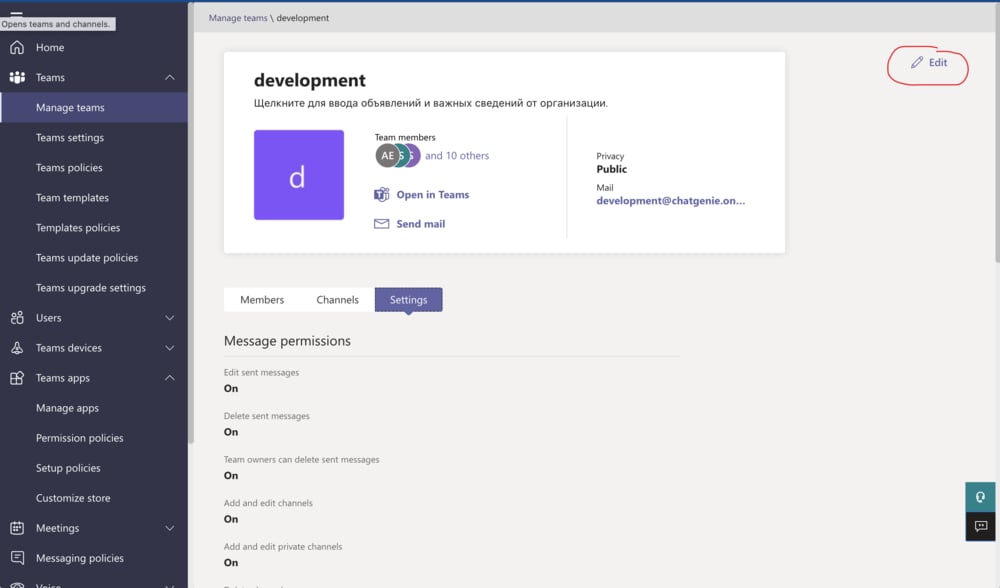
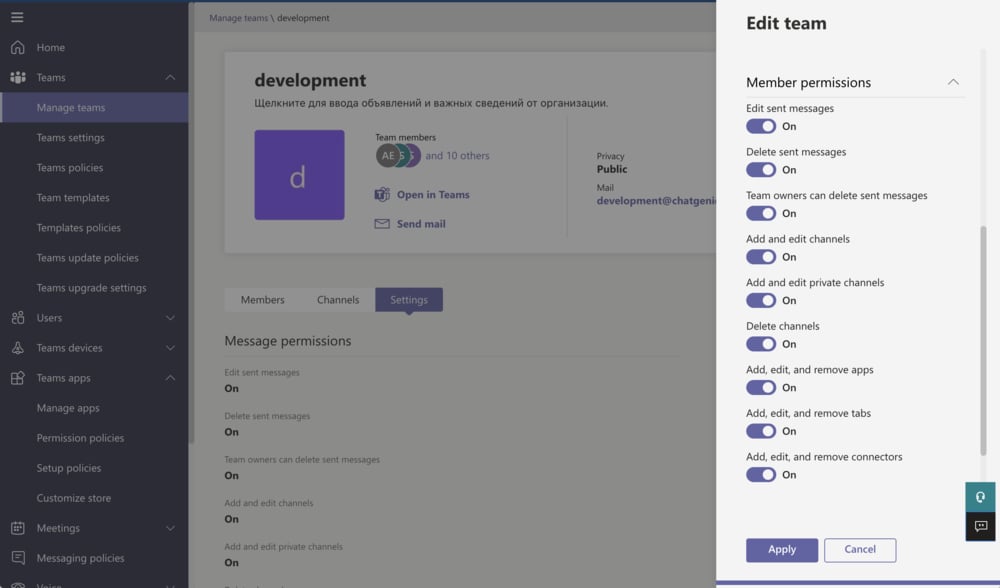
In the Microsoft 365 admin center go to **Admin → Teams → Manage teams**, select your team and click **Edit**. Scroll to the permissions and make sure **adding, editing and removing apps** is ticked.
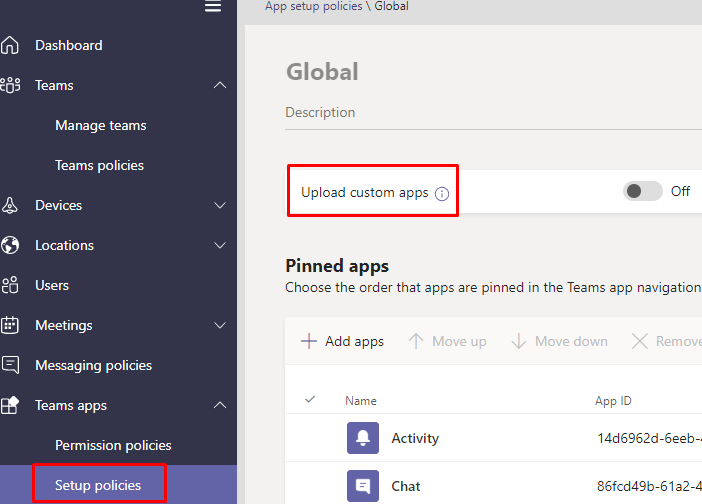
 Go to **Teams apps → Setup policies** and confirm **Upload custom apps** is switched **on** for the team owner.
 Microsoft 365 takes **30 to 60 minutes** to apply this. Wait, then walk through the steps again.
 If you're deploying to a **customer's** tenant rather than your own, see
[deploying the Teams Service App](/messenger/deploy-the-teams-service-app), which covers the
other errors specific to that flow.
## Related topics
- [Install the Teams Companion App](/companion-apps/install-the-teams-companion-app.md)
- [Deploy the Teams Service App to a customer](/messenger/deploy-the-teams-service-app.md)
- [How Thread handles your data](/start-here/roles/security-compliance-owner/data-and-compliance.md)
If you're deploying to a **customer's** tenant rather than your own, see
[deploying the Teams Service App](/messenger/deploy-the-teams-service-app), which covers the
other errors specific to that flow.
## Related topics
- [Install the Teams Companion App](/companion-apps/install-the-teams-companion-app.md)
- [Deploy the Teams Service App to a customer](/messenger/deploy-the-teams-service-app.md)
- [How Thread handles your data](/start-here/roles/security-compliance-owner/data-and-compliance.md)