> ## Documentation Index
> Fetch the complete documentation index at: https://docs.getthread.com/llms.txt
> Use this file to discover all available pages before exploring further.
# Use ConnectWise RMM with Super Magic
> Connect ConnectWise RMM (Asio) to Super Magic so technicians can look up devices, patch status, tasks and scripts from inside a thread. Read-only in this beta.
The ConnectWise RMM integration in Super Magic is in **beta**, and it is **read-only**. Super
Magic can find and report on devices, patching, tasks and scripts — it cannot run or change
anything in RMM yet. Actions will come later and will be confirmation-gated like every other
Super Magic write.
With ConnectWise RMM (Asio) connected, Super Magic can look up devices, patch status, tasks and
scripts across your clients without a technician leaving the thread.
## How the connection works
* **One workspace connection, made once by an admin.** An admin connects ConnectWise RMM with API client credentials on the integrations page. Super Magic uses that single connection for everyone.
* **No per-technician sign-in.** Technicians never connect their own RMM accounts.
* **Pick your region once.** The form has a **Region** selector (US / EU / AU); Thread also infers the region from your Client ID.
If RMM tools aren't appearing in chat, it's either the workspace connection or the Super Magic
toggle — never a per-member sign-in.
## Connect it
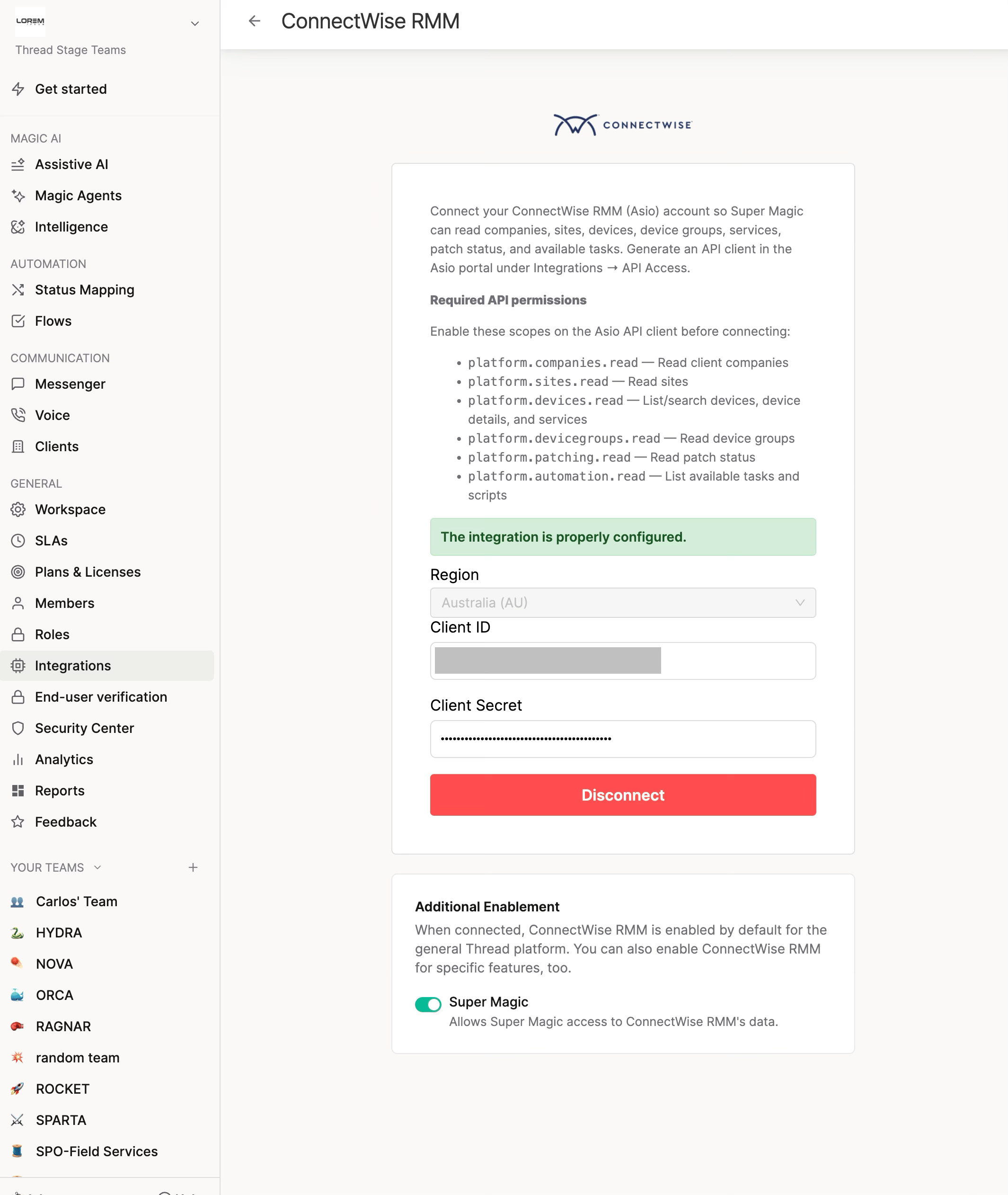
In ConnectWise RMM (Asio), create API client credentials. You'll get a **Client ID** and a **Client Secret**.
The Client Secret is shown **once**, at creation. Store it somewhere safe before you close the dialog.
Go to **Thread Admin → Integrations → ConnectWise RMM**.
| Field | What goes in it | Not this |
| ------------- | -------------------------------------- | ----------------------- |
| Client ID | The API client ID from ConnectWise RMM | ❌ your Asio login email |
| Client Secret | The API client secret | ❌ your Asio password |
Click **Connect**. Thread validates live, so a wrong value fails immediately with an error banner.
On the same integration page, below the connection form, find the **Additional Enablement** card and switch the **Super Magic** toggle **on**.
It's **off by default** — connecting RMM alone does not give Super Magic access. Your existing RMM integration keeps working exactly as before; Super Magic access is opt-in.
 Open **Inbox → Super Magic** and try:
```text theme={null}
List our ConnectWise RMM companies
Search RMM for [computer name]
What's the patch status of [device]?
```
Every technician in the workspace can use the lookups now — there's no per-member step.
## What Super Magic can do
| Capability | What it does |
| ------------------ | -------------------------------- |
| List companies | Your client organizations in RMM |
| List sites | Sites within a company |
| List device groups | Device groupings |
| Search devices | Find computers by name |
| Device detail | Details for a specific machine |
| List services | Services on a device |
| Patch status | Patching state for a device |
| List tasks | Automation tasks |
| List scripts | Available scripts |
| List shell scripts | Available shell scripts |
**Taking action is not available yet.** Asked to change something in RMM, Super Magic says so
plainly and points the technician to ConnectWise RMM. When actions arrive they'll go through the
**Confirm action** card and respect your write-access settings.
## Troubleshooting
| Symptom | Cause | Fix |
| ----------------------------------------------------------- | ------------------------------------ | ---------------------------------------------------------------------------------------------------------------- |
| "The configuration is incorrect, check the data is correct" | Client ID or Secret wrong | Re-create the API client credentials in ConnectWise RMM and re-enter them — the Secret is only shown at creation |
| Connection works but no RMM tools in chat | Super Magic toggle off | Turn on the **Super Magic** toggle under **Additional Enablement** |
| Super Magic refuses to run a script or modify a task | Expected — this beta is read-only | Lookups only for now; actions are on the roadmap |
| No ConnectWise RMM card on the Integrations page | RMM not available for your workspace | Contact Thread support |
## Next step
See the [Super Magic tool reference](/super-magic/super-magic-tool-reference) for everything Super
Magic can reach, or connect [NinjaOne](/super-magic/connecting-ninja-one-to-super-magic) if you
run that too.
## Related topics
- [ConnectWise RMM](/skill-library/by-connector/connectwise-rmm.md)
- [Intune vs RMM Reconciliation](/skill-library/devices-and-infrastructure/intune-rmm-reconciliation.md)
- [RMM Cross-Tool Reconciliation](/skill-library/devices-and-infrastructure/rmm-cross-tool-reconciliation.md)
Open **Inbox → Super Magic** and try:
```text theme={null}
List our ConnectWise RMM companies
Search RMM for [computer name]
What's the patch status of [device]?
```
Every technician in the workspace can use the lookups now — there's no per-member step.
## What Super Magic can do
| Capability | What it does |
| ------------------ | -------------------------------- |
| List companies | Your client organizations in RMM |
| List sites | Sites within a company |
| List device groups | Device groupings |
| Search devices | Find computers by name |
| Device detail | Details for a specific machine |
| List services | Services on a device |
| Patch status | Patching state for a device |
| List tasks | Automation tasks |
| List scripts | Available scripts |
| List shell scripts | Available shell scripts |
**Taking action is not available yet.** Asked to change something in RMM, Super Magic says so
plainly and points the technician to ConnectWise RMM. When actions arrive they'll go through the
**Confirm action** card and respect your write-access settings.
## Troubleshooting
| Symptom | Cause | Fix |
| ----------------------------------------------------------- | ------------------------------------ | ---------------------------------------------------------------------------------------------------------------- |
| "The configuration is incorrect, check the data is correct" | Client ID or Secret wrong | Re-create the API client credentials in ConnectWise RMM and re-enter them — the Secret is only shown at creation |
| Connection works but no RMM tools in chat | Super Magic toggle off | Turn on the **Super Magic** toggle under **Additional Enablement** |
| Super Magic refuses to run a script or modify a task | Expected — this beta is read-only | Lookups only for now; actions are on the roadmap |
| No ConnectWise RMM card on the Integrations page | RMM not available for your workspace | Contact Thread support |
## Next step
See the [Super Magic tool reference](/super-magic/super-magic-tool-reference) for everything Super
Magic can reach, or connect [NinjaOne](/super-magic/connecting-ninja-one-to-super-magic) if you
run that too.
## Related topics
- [ConnectWise RMM](/skill-library/by-connector/connectwise-rmm.md)
- [Intune vs RMM Reconciliation](/skill-library/devices-and-infrastructure/intune-rmm-reconciliation.md)
- [RMM Cross-Tool Reconciliation](/skill-library/devices-and-infrastructure/rmm-cross-tool-reconciliation.md)