

 Magic Library
IT Glue + Super Magic
Concept
Connect your IT Glue documentation to Super Magic so your technicians get relevant articles surfaced directly inside Thread Inbox — with no manual exports, no uploads, and no day-to-day maintenance.How Super Magic surfaces IT Glue articles
Once connected, Super Magic surfaces relevant IT Glue articles two ways:- On-demand: when a technician asks Super Magic a question, it searches your IT Glue library and returns up to 3 relevant article links as part of the response.
- Proactively: when a thread opens, the Super Magic panel automatically surfaces relevant IT Glue articles alongside contact history and past threads, before the technician asks anything.
How to
Before you start
1
Open IT Glue settings in Thread
In Thread, go to Admin → Integrations and select IT Glue.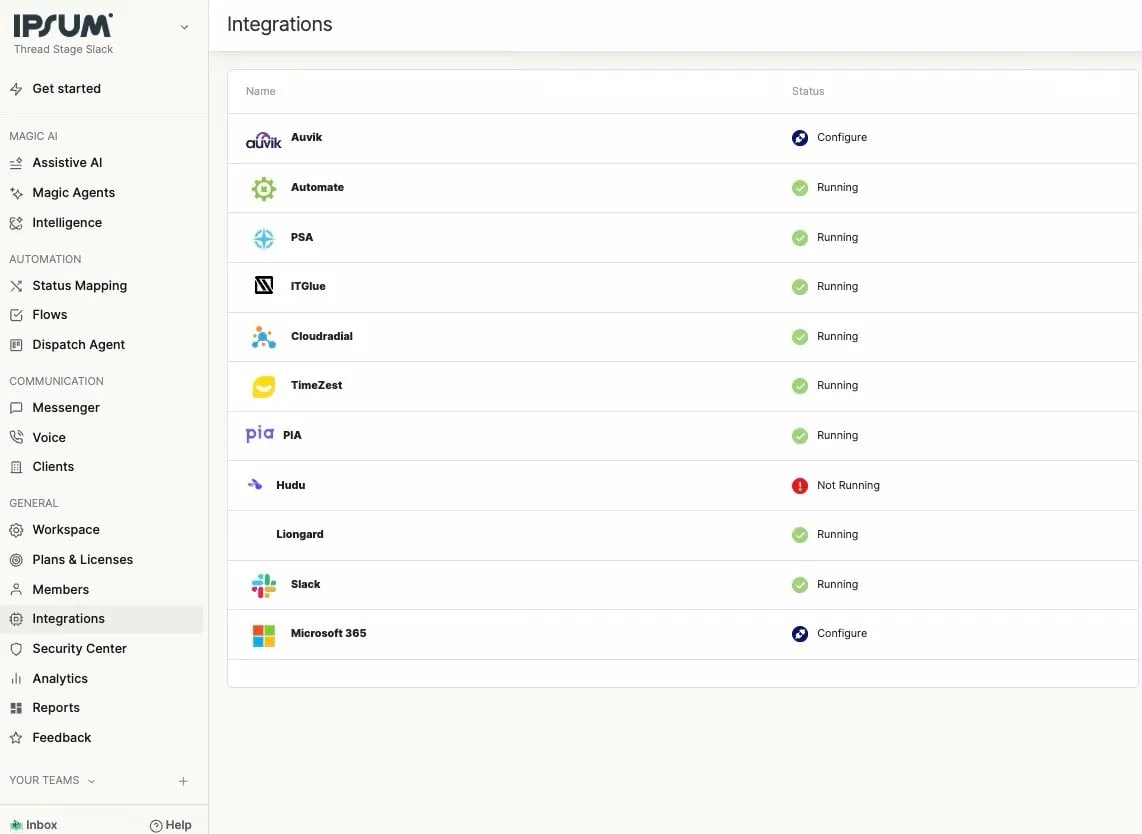
2
Connect your API key
On the Configuration tab, enter your IT Glue Base URL and API Key, then click Connect. The page shows “The integration is properly configured” in green when successful.Use the Base URL for your IT Glue data center: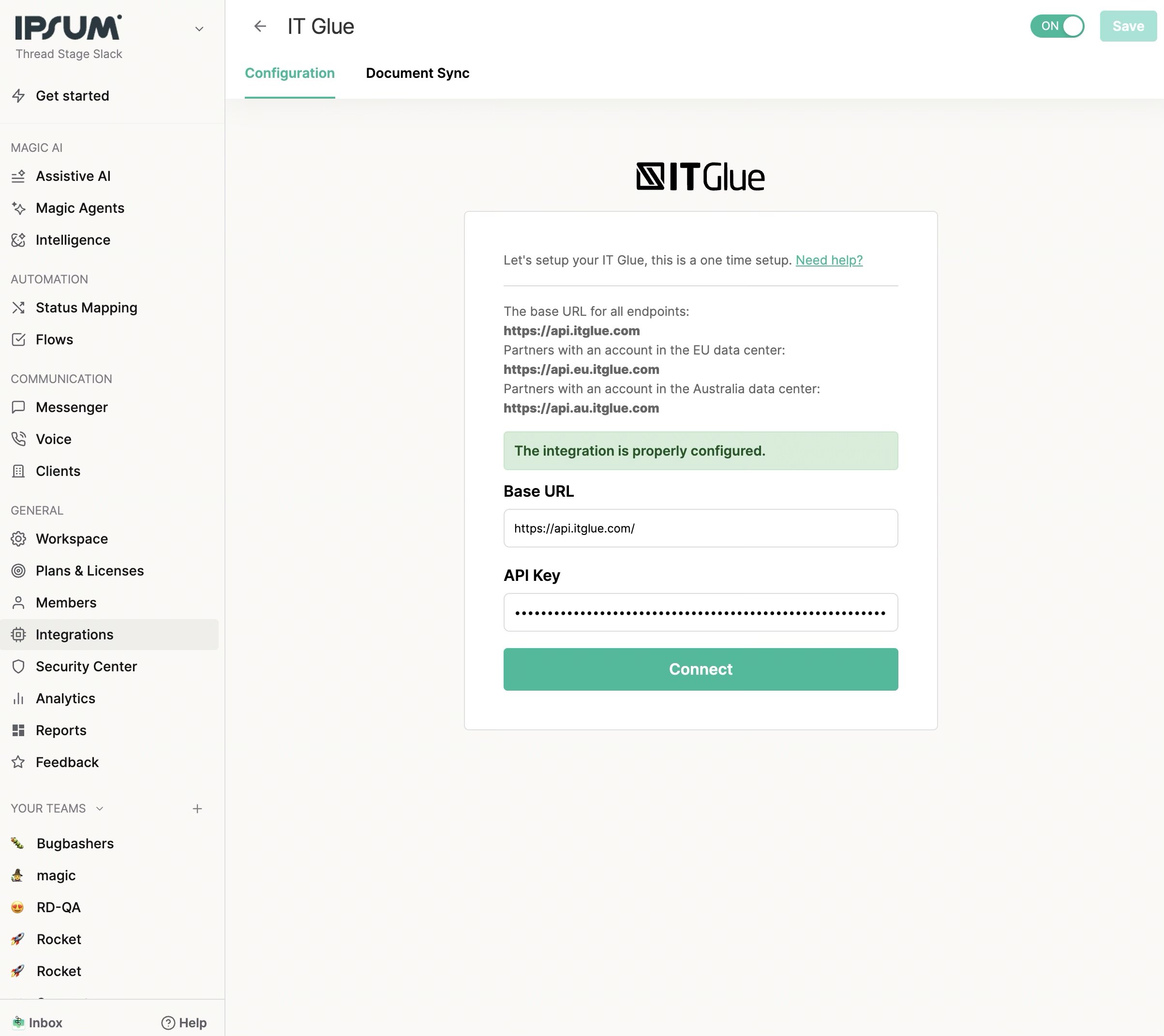
3
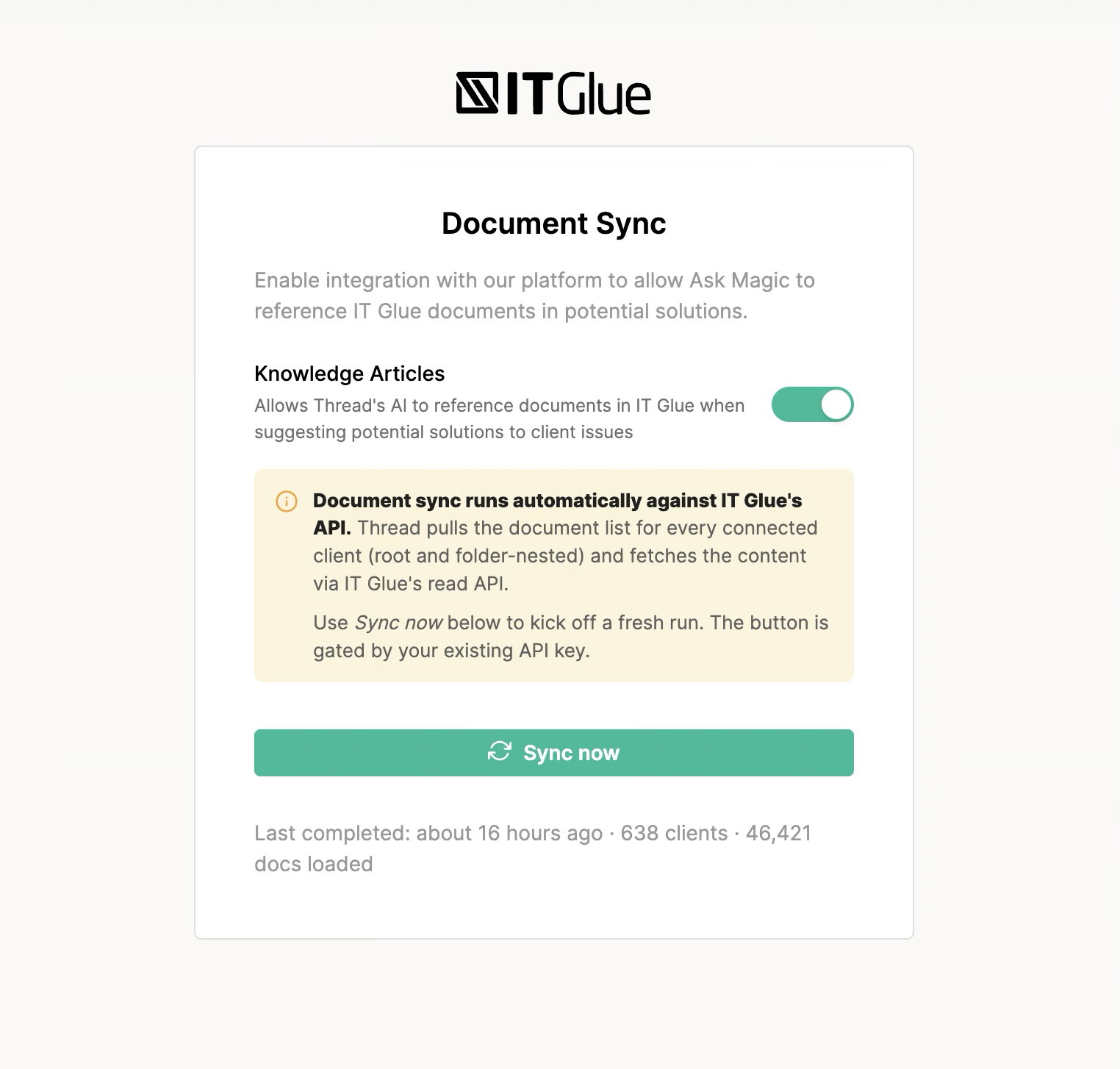
Enable Knowledge Articles (Document Sync tab)
4
Verify
That’s it. Thread immediately begins importing your IT Glue documentation in the background. The first sync may take a few minutes to a few hours depending on the size of your library — you’ll see progress on the Document Sync tab.Once the first sync completes, open any thread in Inbox, click into Super Magic, and ask a question related to something covered in your IT Glue docs. Relevant article links will appear in the response
How the sync works
Automatic, nightly, incremental Thread runs an incremental sync against your IT Glue library every night starting at 03:20 UTC. Each run:- Walks the IT Glue API for each organization that already has documents in Thread’s index, including documents nested inside folders.
- Compares each document’s updated_at timestamp to what Thread has on file.
- Pulls the latest content for any document that has changed.
- Thread compares IT Glue’s updated_at timestamp on each document against the last time we synced it. Documents that haven’t changed are skipped entirely, no API call, no re-indexing. This is why even large IT Glue accounts typically complete their nightly sync in minutes rather than hours.
- Every active IT Glue organization mapped to a Thread client.
- Every document inside those organizations, including documents nested inside folders.
- Document content, name, organization, and metadata required for company-scoped retrieval.
What sync statuses mean
Within a run, individual clients can be marked:
How article retrieval works
When Super Magic responds to a technician on a specific ticket:
Up to 3 IT Glue article links are returned per response. Super Magic links to your articles — it does not summarize or modify their content.
How Thread Matches Companies to ITG Organizations (by PSA)
To surface IT Glue configuration data on a ConnectWise ticket, the company ID on the ConnectWise ticket must match the organization’s short name in IT Glue, and a configuration’s serial number must be the same in both ConnectWise and IT Glue.
Permissions and data handling
- API scope: The integration uses a single API key to read documents from IT Glue. Every document the key can see is eligible for ingestion — Thread does not currently filter by IT Glue’s per-document permissions, and no per-document ACL or user-context filtering is applied at our boundary. For customers storing sensitive content (security scans, credentials, internal-only runbooks), this is worth considering when evaluating the integration. Granular folder-level and pattern-based exclusion controls within Thread are on our roadmap.
- API key permissions: read-only document access is all that’s required. You can rotate or revoke the key at any time without affecting anything else in IT Glue.
- Where data is stored: synced document content lives in Thread’s encrypted application database (AWS US East). It is never written to disk in plain text and never leaves Thread’s infrastructure during retrieval.
- AI processing: when an article is surfaced to Super Magic, its content is included in the prompt sent to the AI model. Prompts and completions are processed in memory only and are not retained or used for model training.
- Disconnecting: removing the integration in Thread purges the synced inventory and stops all future syncs.
FAQ
How do I generate an IT Glue API key?
How do I generate an IT Glue API key?
In IT Glue, go to Account → API Keys and create a new key with read access. Paste the key into the Configuration tab in Thread.
Does the API key need Password Access?
Does the API key need Password Access?
No. The integration only reads documents. A standard read-only key is sufficient.
How often does Thread re-sync?
How often does Thread re-sync?
Automatically every night starting at 03:20 UTC, plus any sync now you trigger manually. Nightly syncs are incremental — only changed documents are pulled.
How long does a sync take?
How long does a sync take?
First sync: minutes to a few hours depending on library size. Nightly incremental syncs: typically minutes, since only changed documents are processed.
Will Super Magic show documentation from other companies I support?
Will Super Magic show documentation from other companies I support?
No. Results are scoped to the company on the thread.
Will folder-nested documents be synced?
Will folder-nested documents be synced?
Yes. Thread surfaces both root-level documents and documents nested inside IT Glue folders.
Does Thread sync IT Glue flexible assets?
Does Thread sync IT Glue flexible assets?
No. The integration syncs documents only. Flexible assets are not synced and are not searchable from Super Magic. Configuration data can still be surfaced on ConnectWise tickets by serial-number match, as described above.
What if Super Magic returns no IT Glue results?
What if Super Magic returns no IT Glue results?
Check that:
- The first sync has completed (see the last synced timestamp on the Document Sync tab).
- Knowledge Articles is toggled on.
- Relevant articles exist in IT Glue for that company.
Can I add new documents and have them appear immediately?
Can I add new documents and have them appear immediately?
Documents published in IT Glue become available in Super Magic at the next scheduled sync, which runs nightly starting at 03:20 UTC. If you need a document available sooner, use the Sync now button on the Document Sync tab to trigger an immediate run. For a brand-new organization’s first document, use Sync now: nightly runs only cover organizations that already have synced documents.
Why do I get a "Platform was configured before" error during setup?
Why do I get a "Platform was configured before" error during setup?
Thread returns this error when the workspace already has an IT Glue configuration and you try to set up a new one. Each integration can be configured only once per workspace. Go to Admin → Integrations → IT Glue: if the integration already shows as connected, edit the existing configuration to update your Base URL or API key instead of starting a fresh setup. To start over completely, disconnect the existing configuration first, then reconnect.
Can I disconnect the integration?
Can I disconnect the integration?
Yes. Removing the integration in Admin → Integrations → IT Glue stops all syncs and purges the synced inventory from Thread.
Is there an API rate limit I should worry about?
Is there an API rate limit I should worry about?
No — Thread respects IT Glue’s API rate ceiling and serializes sync work to stay well under it. Your IT Glue performance won’t be affected.