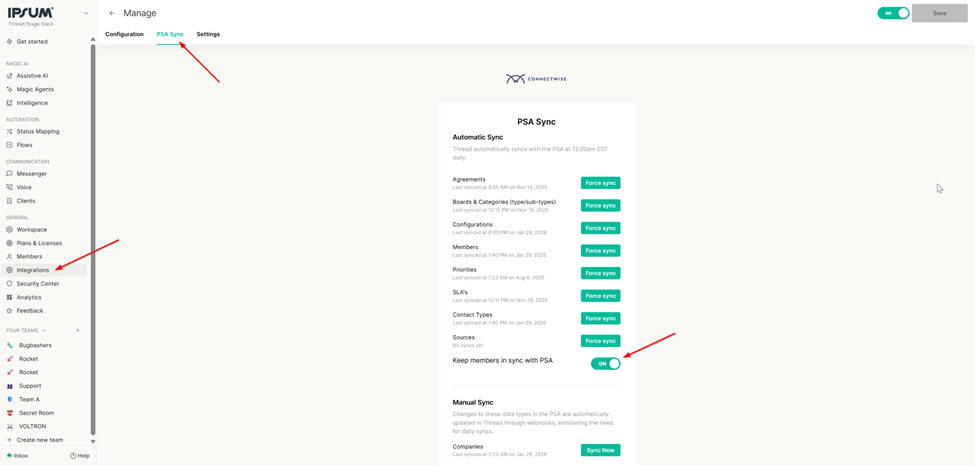
Keep Members in Sync with PSA Toggle

Member Syncing with PSA
Maintaining an accurate list of team members is essential for ensuring that service delivery and communication flow smoothly within Thread. The Keep Members in Sync with PSA toggle automates the management of your member list by mirroring the status of users in your Professional Services Automation (PSA) tool.
The Value of PSA Syncing
Manually updating member lists as employees join or leave your organization is time-consuming and prone to human error. By enabling this sync, you ensure that:
- Security stays tight: When a member is deactivated in your PSA, their status is automatically updated in Thread.
- Onboarding is seamless: New members added to your PSA are automatically recognized by Thread.
- Data integrity: You maintain a single source of truth for your team’s active status.
How It Works
The behavior of the member sync depends on whether the toggle is active. By default, this setting is ON.
Feature State | Logic & Behavior |
Toggle ON | Thread performs a daily sync to grab a fresh copy of your PSA member data. • Active Members: If a member is active in the PSA, they are placed in the ACTIVE bin. • Inactive Members: If the PSA "inactive" flag is triggered, they are moved to the DELETED bin. • Note: If a member is already in the DELETED bin, the sync will not automatically move them back to ACTIVE. |
Toggle OFF | Thread will only sync newly discovered members. These new additions are placed into the Pending bin. Existing members currently in Thread will remain in their current state regardless of changes in the PSA. |
How to Manage Member Sync
You can find and adjust this setting within your Thread environment by following these steps:
- Navigate to the Admin Panel.
- Select Integrations from the sidebar.
- Click on PSA.
- Open the PSA Sync tab.
- Locate the Keep Members in Sync with PSA toggle to adjust your preference.