

 Magic Library
Listening Mode for Triage Agents
The Concept
Listening Mode is an enhanced state for your Triage Agent that replaces the previous “Timeout” function. Instead of simply turning off when a contact stops responding, the Triage Agent enters a “listening” state. In this mode, the agent remains active in the thread, ready to re-engage instantly if the contact returns, while allowing the Reminder Agent to handle follow-ups in the background.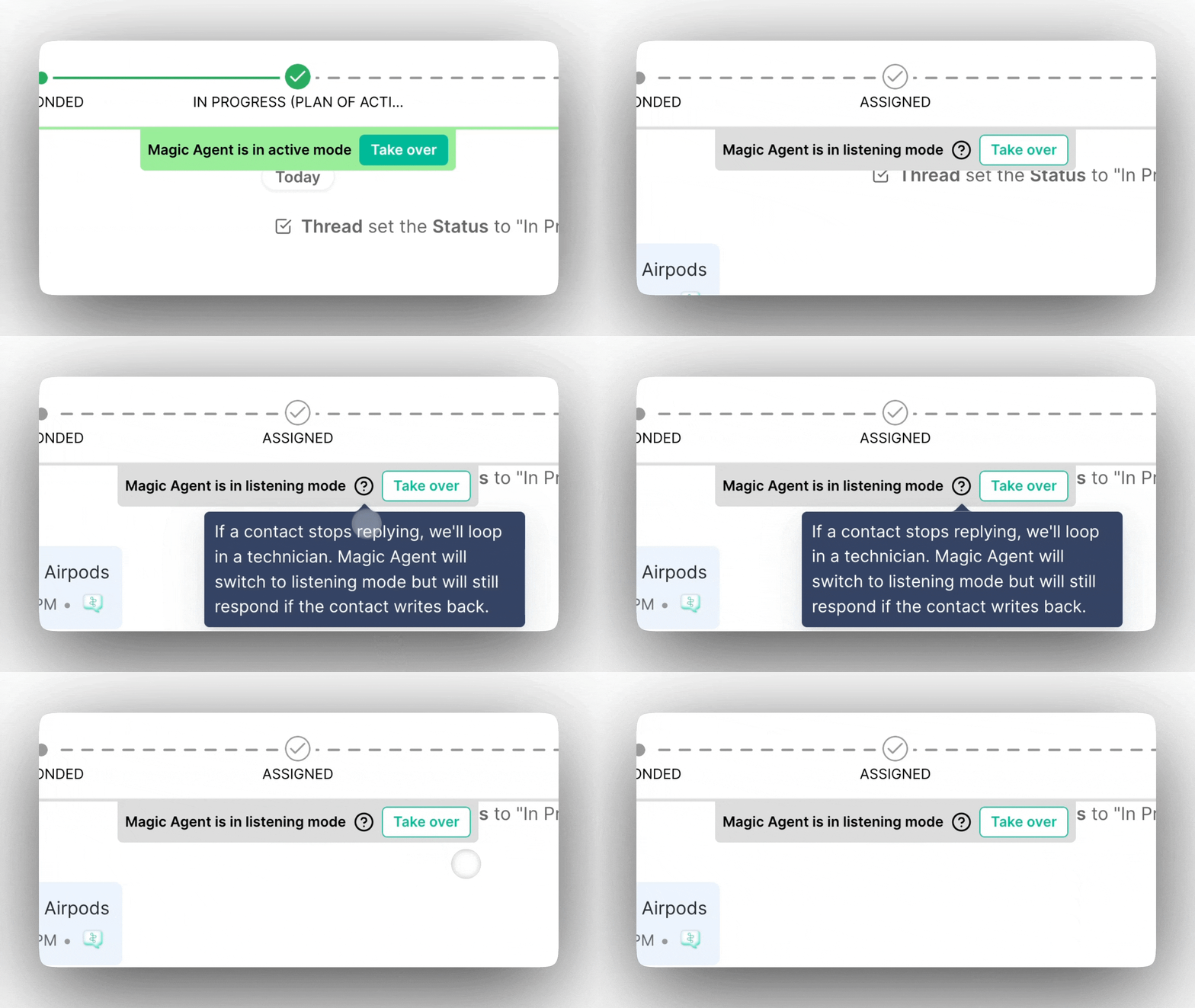
The Value
Integrating Listening Mode into your workflow provides several key advantages for your team:- Increased No-Touch Resolutions: Users are automatically nudged to reply, often resolving tickets without any technician intervention.
- Higher Quality Triage: Ensures threads are fully triaged with complete context before a human ever needs to step in.
- Eliminate Stalled Tickets: Prevents threads from sitting idle in the inbox, keeping your workspace organized.
- Reduced Manual Workload: Automates the “chasing” process, allowing technicians to focus on high-value tasks.
Why it helps
How to Use Listening Mode
1. Configuration
You can find these settings in the Admin section under Magic Agents: Set the Timer: Define how much time should pass before the agent switches from active triage to Listening Mode.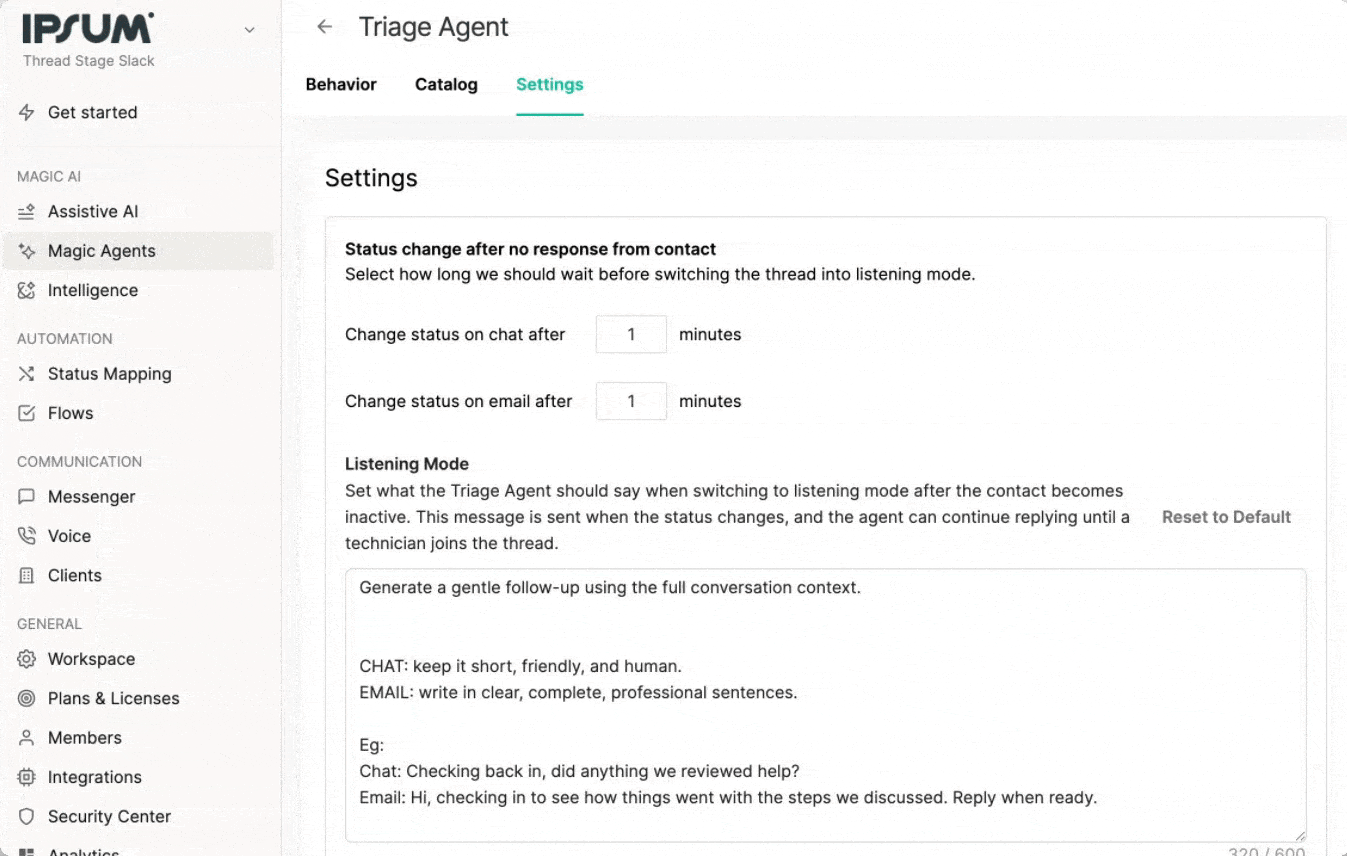
2. Re-engagement & Handoff
Automatic Return: If a contact replies to a Reminder Agent message during Listening mode, the Triage Agent automatically “wakes up” and resumes the conversation to drive it toward completion. The thread returns to your mapped Active status. Ending the Session: The Triage Agent will stay in Listening Mode until one of the following occurs:- A technician manually replies (external note) to the thread or clicks the “Takeover” button
- The triage process is complete (the Agent has successfully gathered all necessary information and resolved the issue or properly routed it)
3. Availability
Listening Mode is available for all AI Pro partners at Thread and is fully functional across both Email and Chat sources.Timeout Fallback
We know every workspace transitions at its own pace. To support that, we’ve added a Timeout Fallback toggle in Triage Agent → Settings → Post-Triage. This option lets you continue using the previous inactivity behavior — where the agent deactivates after the contact becomes inactive — while your team gets familiar with everything Listening Mode has to offer.How to Set It Up
Navigate to Post-Triage settings
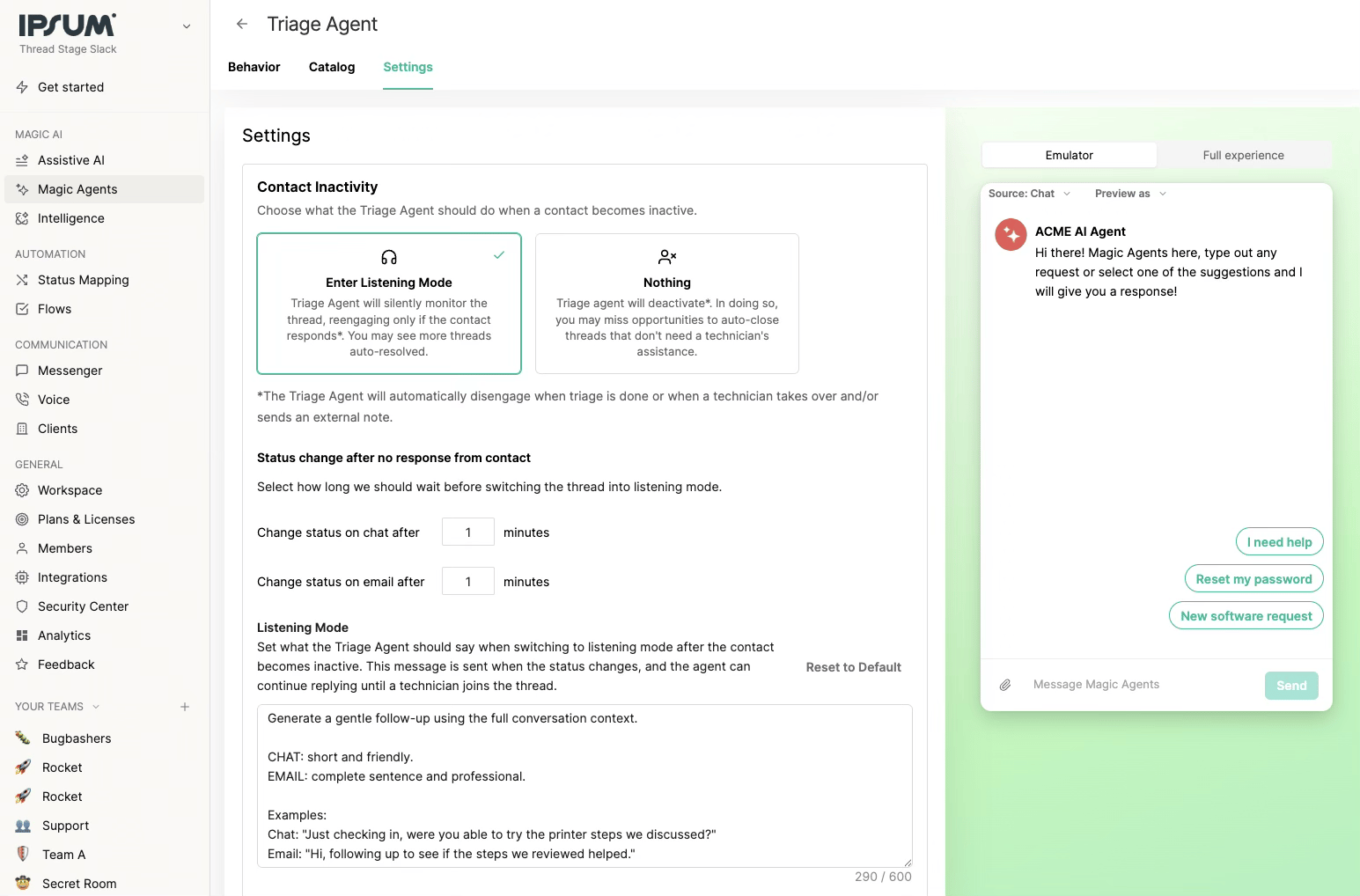
Edit your timeout message prompt
Save your changes
- The Listening Mode execution logic (including inactivity message handling) does not run.
- The system follows the previous inactivity behavior where the agent deactivates after the timeout period.
- No changes occur to triage routing or Magic AI post-deactivation actions.
- The toggle applies only to new inactivity events — existing conversations are not affected.
Key Behavior Changes from Previous Timeout Function
What Used to Happen Previously:- The Triage Agent sent the timeout message once
- Then immediately disengaged
- This often caused threads to stall or remain unresolved till a human picks it up
- It sends your timeout message every time the contact becomes inactive
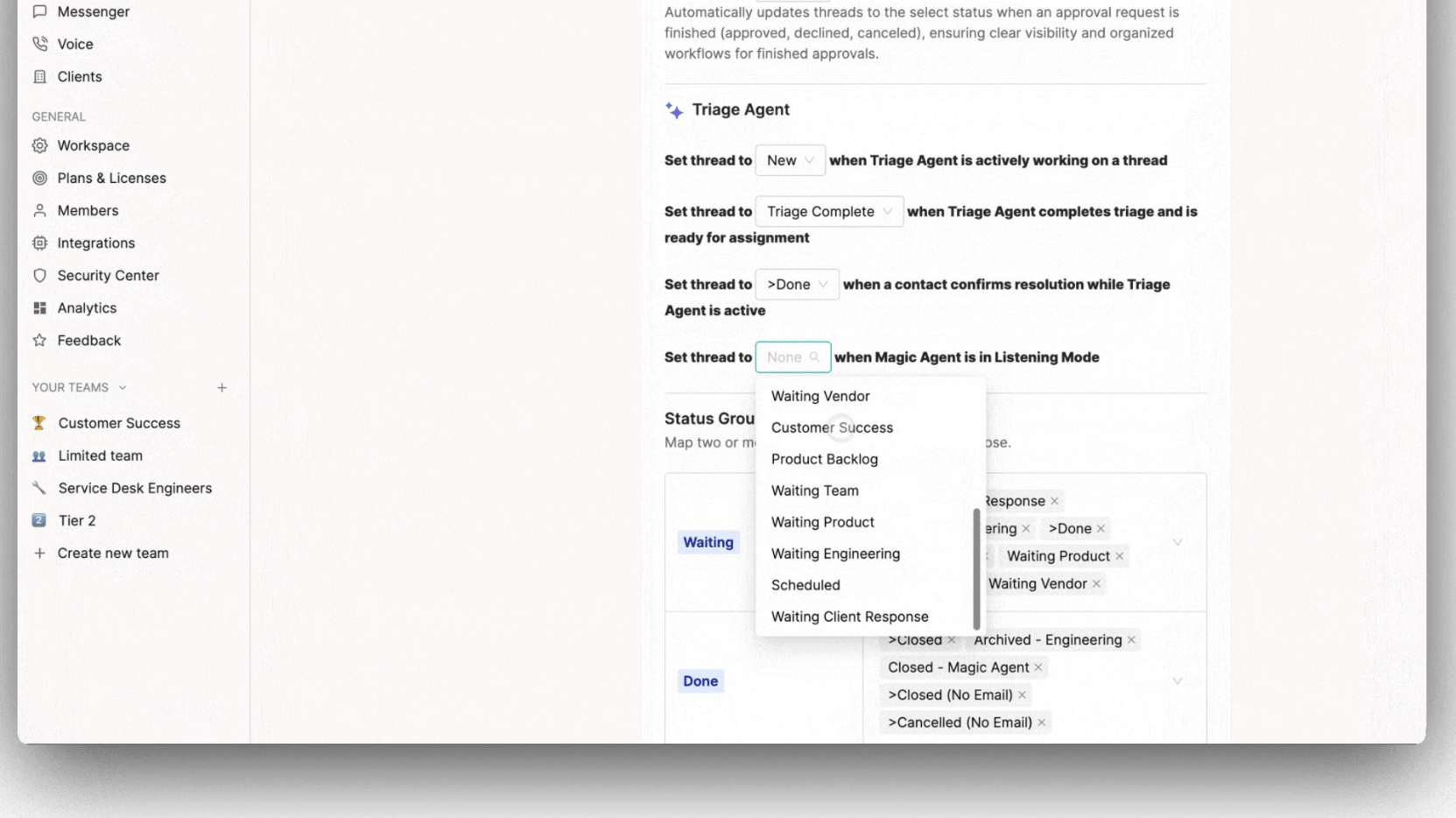
- It updates the thread to the mapped Listening Mode status (based on priority logic above)
- It waits silently for the contact to return
- The Triage Agent automatically becomes active again
- The thread returns to your mapped Active status
- The Agent resumes the conversation naturally and continues supporting the user
Generative Follow-Up Messages
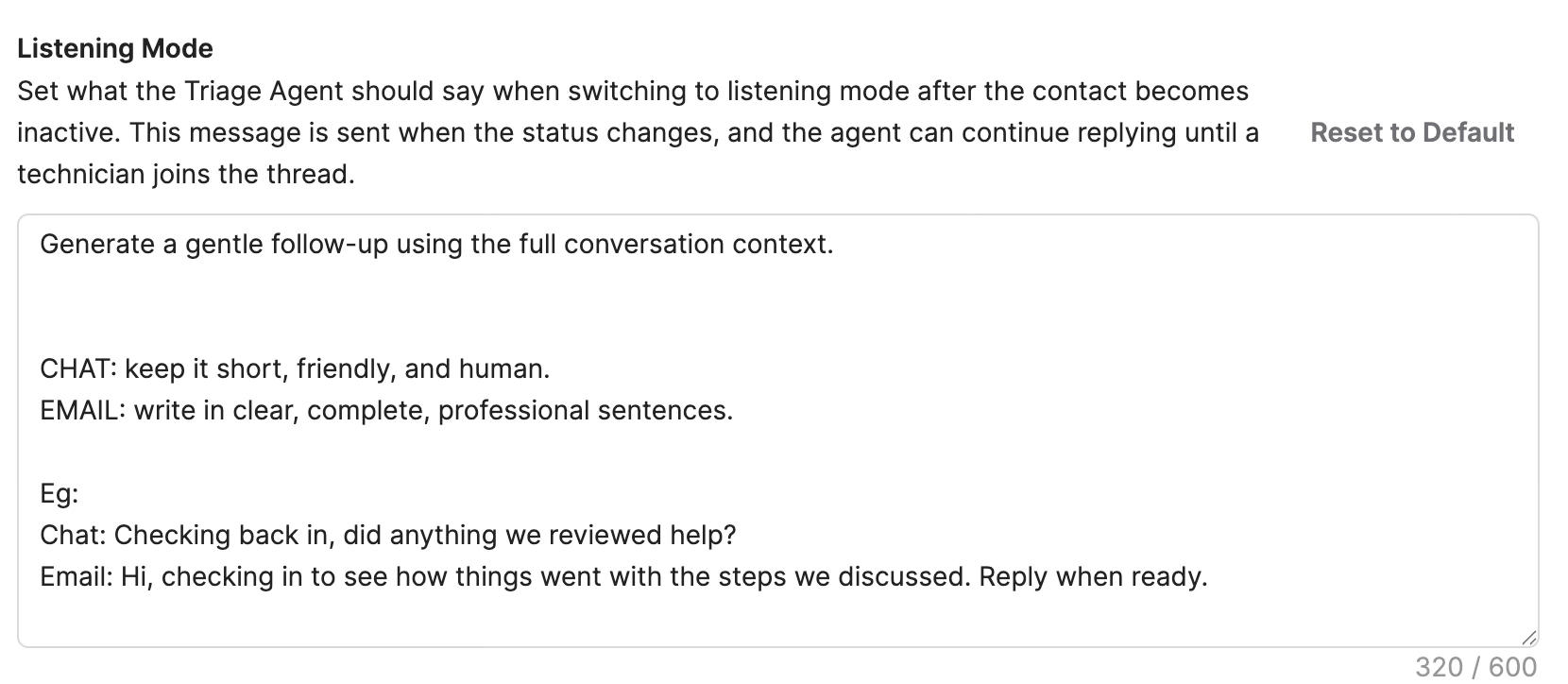
If your timeout message instructs the Agent to generate a follow-up, it will use the full conversation context to write a natural, human-like nudge. Default template for inspiration: Generate a gentle follow-up using the full conversation context. CHAT: short and friendly. EMAIL: complete sentence and professional. Examples: Chat: “Just checking in, were you able to try the printer steps we discussed?” Email: “Hi, following up to see if the steps we reviewed helped.”Silence timeout message
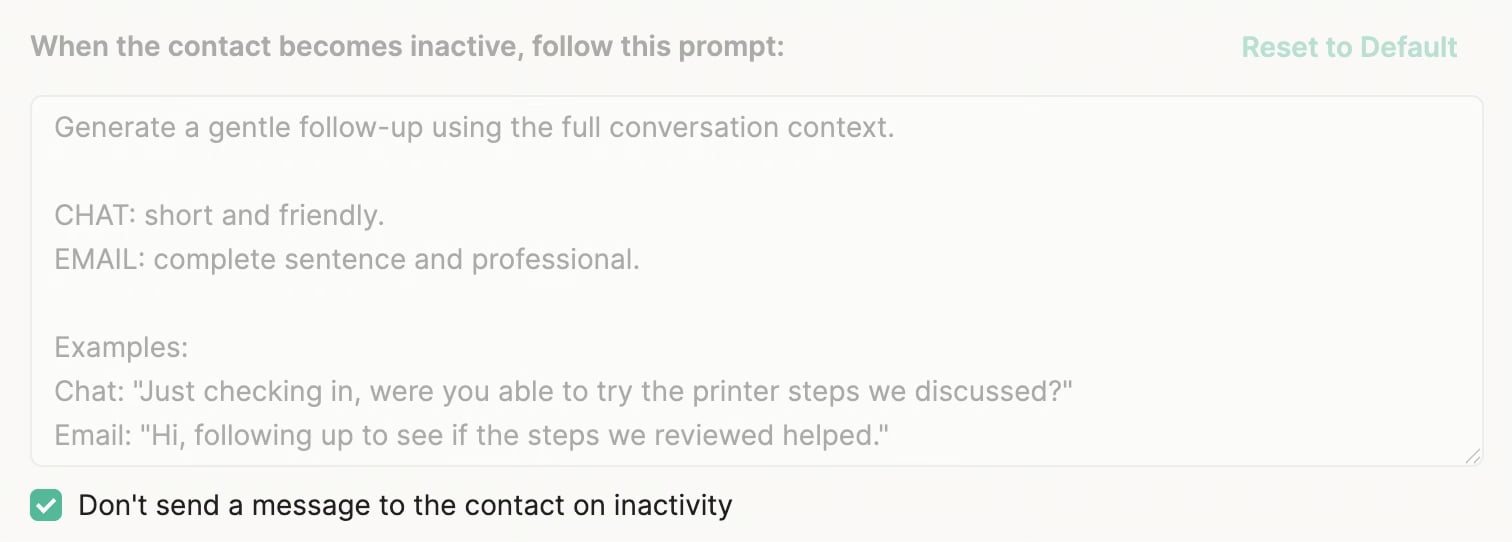
- Works alongside Listening Mode whether it’s enabled or disabled. With Listening Mode on and this toggle on, the thread enters Listening Mode silently. With Listening Mode off and this toggle on, the agent deactivates without a final message.
- Overrides any custom timeout message you’ve set. If you’ve configured one and turn this on, the custom message will not be sent.
Common Scenarios
Scenario 1: Standard Listening Mode Flow Setup: Listening Mode timer set to 5 minutes, custom Listening Mode status configured as “Waiting on User”, Reminder Agent configured to send follow-ups every 24 hours. Flow:- Triage Agent assists user with password reset issue
- User stops responding for 5 minutes
- Thread status changes to “Waiting on User”
- Reminder Agent sends follow-up after 24 hours
- User replies: “Thanks, I’m back now”
- Triage Agent re-engages automatically, status returns to “Active”
- Agent continues assisting until issue is resolved/triaged
- Triage Agent helps user troubleshoot network connectivity
- User becomes inactive, Agent enters Listening Mode
- User returns after first reminder, Agent re-engages
- User goes inactive again during the conversation
- Agent enters Listening Mode again and sends timeout message a second time
- Process repeats until technician takes over or issue is fully resolved/triaged
- Triage Agent triages a hardware request
- User becomes inactive
- Since no custom Listening Mode status is set, thread moves to “Triage Complete” status
- Agent waits in Listening Mode
- User returns, Agent re-engages and continues
- Triage Agent in Listening Mode waiting for user response
- Technician reviews the thread and clicks “Takeover”
- Listening Mode ends immediately
- Triage Agent no longer responds, even if user replies
- Technician handles the conversation manually
Frequently Asked Questions
How long does the Triage Agent stay in Listening Mode?
How long does the Triage Agent stay in Listening Mode?
Will the timeout message be sent multiple times?
Will the timeout message be sent multiple times?
What happens to the thread status when entering Listening Mode?
What happens to the thread status when entering Listening Mode?
Can I prevent the Triage Agent from re-engaging after it enters Listening Mode?
Can I prevent the Triage Agent from re-engaging after it enters Listening Mode?
How does Listening Mode work with the Reminder Agent?
How does Listening Mode work with the Reminder Agent?
What's the difference between the timeout message and Reminder Agent messages?
What's the difference between the timeout message and Reminder Agent messages?
Can I customize the timeout message for different channels?
Can I customize the timeout message for different channels?
Is there a limit to how many times the Agent can enter and exit Listening Mode in a single thread?
Is there a limit to how many times the Agent can enter and exit Listening Mode in a single thread?
Does Listening Mode work for both Email and Chat channels?
Does Listening Mode work for both Email and Chat channels?
What is Timeout Fallback?
What is Timeout Fallback?
Does enabling Timeout Fallback affect existing conversations?
Does enabling Timeout Fallback affect existing conversations?