IT Glue + Super Magic Partner Guide

IT Glue + Super Magic
Concept
Connect your IT Glue documentation to Super Magic so your technicians get relevant articles surfaced directly inside Thread Inbox — with no manual exports, no uploads, and no day-to-day maintenance.
Value
Once connected, IT Glue becomes a live documentation source for Super Magic. Thread pulls your library through the IT Glue API, refreshes it nightly, and surfaces relevant articles to technicians automatically:
- On-demand — when a technician asks Super Magic a question, it searches your IT Glue library and returns up to 3 relevant article links as part of the response.
- Proactively — when a thread opens, the Super Magic panel automatically surfaces relevant IT Glue articles alongside contact history and past threads, before the technician asks anything.
Results are scoped to the company on each thread, so technicians only see documentation relevant to the client they're supporting.
How to
Before you start
Requirement | Details |
Active IT Glue subscription | With your documentation populated. |
IT Glue API key | Read access only is sufficient. Password Access is not required. Generate in IT Glue → Account → API Keys. |
Knowledge Articles enabled in Thread | The integration is enabled per workspace. Reach out to your Thread CSM if you don't see the option. |
Step 1 — Open IT Glue settings in Thread
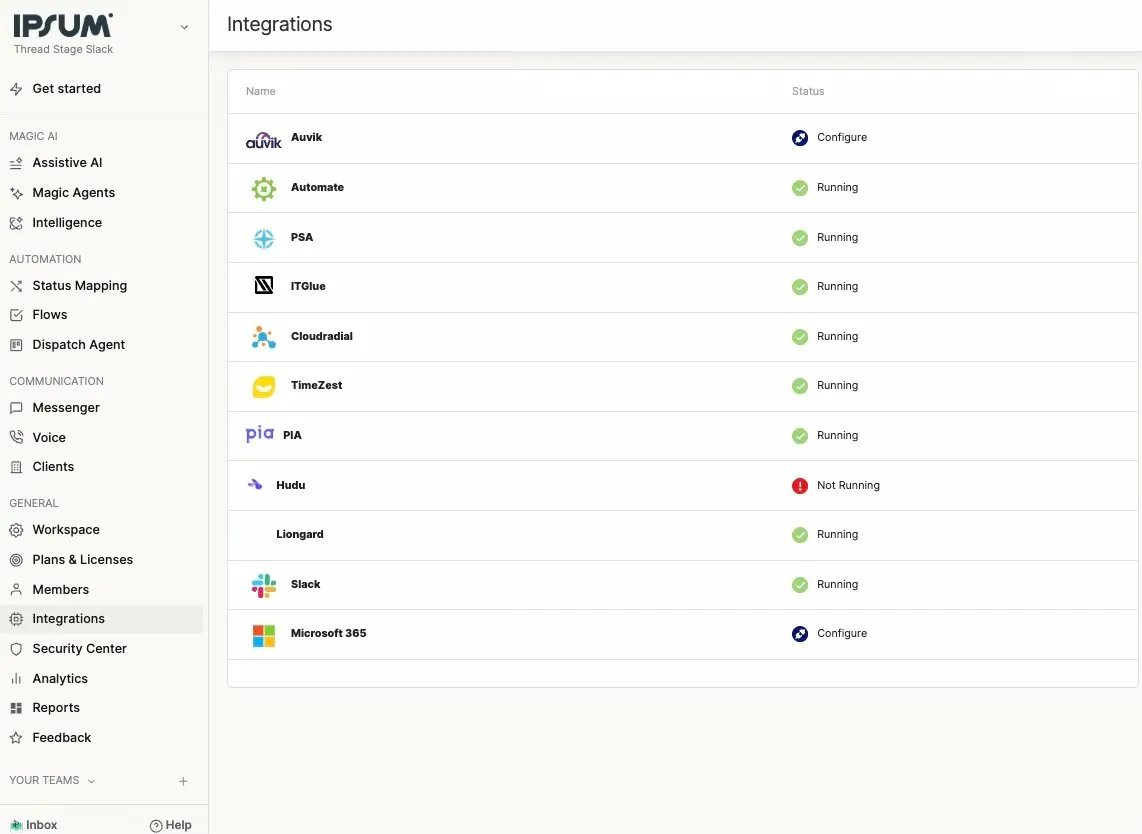
In Thread, go to Admin → Integrations and select IT Glue.
Step 2 — Connect your API key
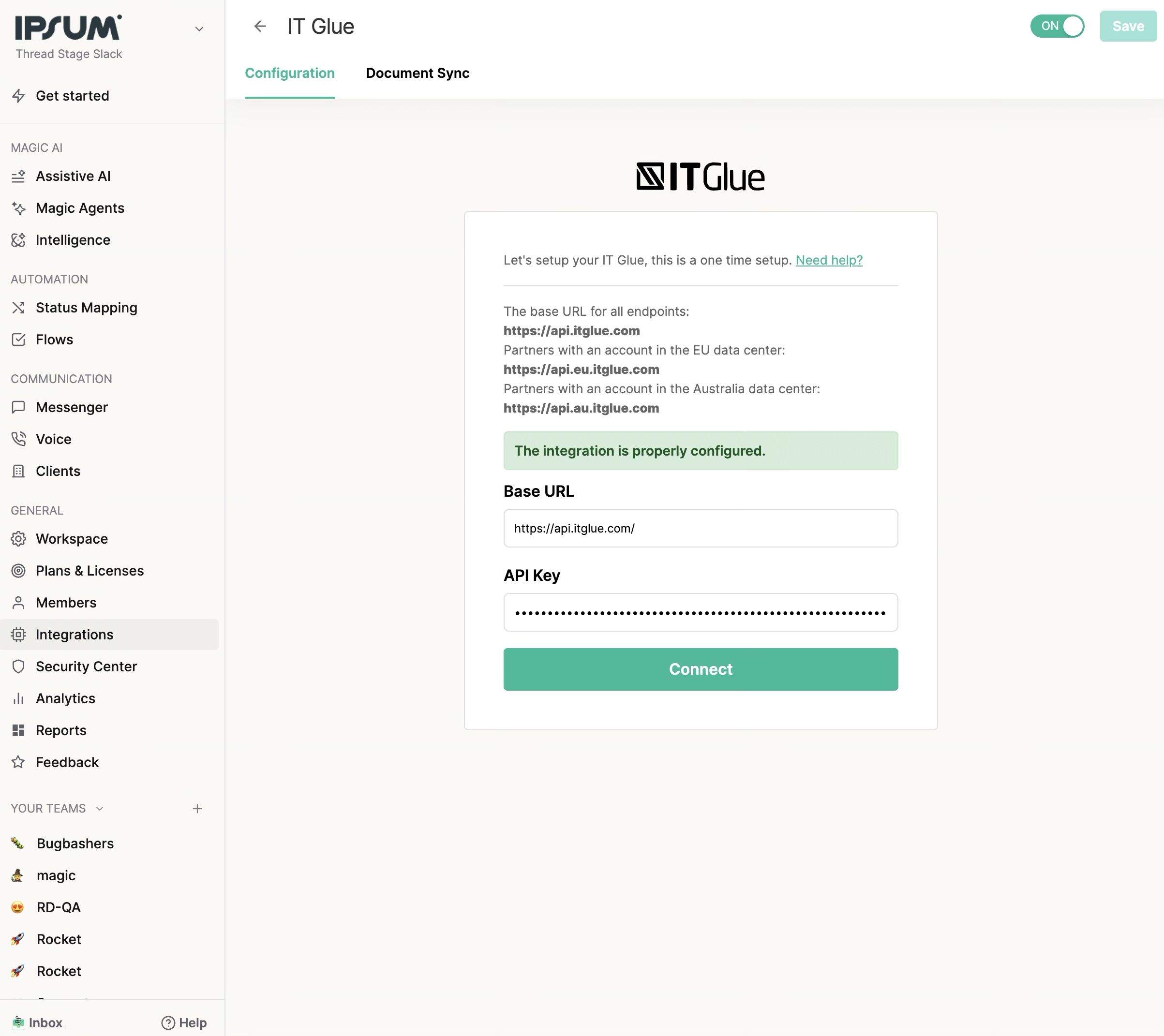
On the Configuration tab, enter your IT Glue Base URL and API Key, then click Connect. The page shows "The integration is properly configured" in green when successful.
Step 3 — Enable Knowledge Articles (Document Sync tab)
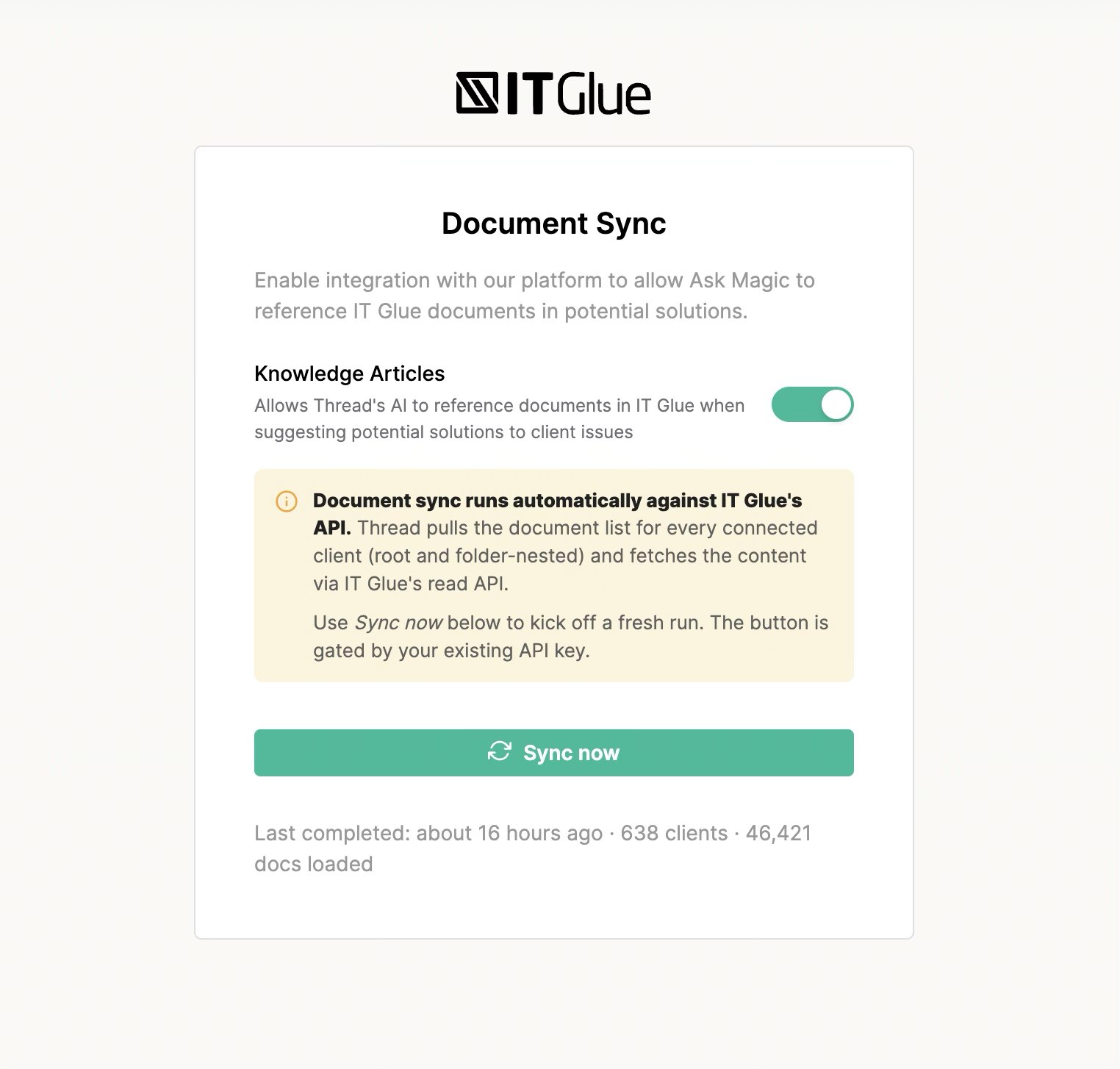
Click the Document Sync tab. Under Knowledge Articles, toggle on the setting "Allows Thread's AI to reference documents in IT Glue when suggesting potential solutions to client issues."
This is what authorizes Thread to start syncing your IT Glue library.
Step 4 — Verify
That's it. Thread immediately begins importing your IT Glue documentation in the background. The first sync may take a few minutes to a few hours depending on the size of your library — you'll see progress on the Document Sync tab.
Once the first sync completes, open any thread in Inbox, click into Super Magic, and ask a question related to something covered in your IT Glue docs. Relevant article links will appear in the response
How the sync works
Automatic, nightly, incremental
Thread runs an incremental sync against your IT Glue library every night at 03:00 UTC. Each run:
- Walks the IT Glue API per organization, including documents nested inside folders.
- Compares each document's updated_at timestamp to what Thread has on file.
- Pulls the latest content for any document that has changed.
- Thread compares IT Glue's updated_at timestamp on each document against the last time we synced it. Documents that haven't changed are skipped entirely — no API call, no re-indexing. This is why even large IT Glue accounts typically complete their nightly sync in minutes rather than hours.
The nightly window is sized to absorb slow runs without leaving a coverage gap, so changes you make in IT Glue today will be reflected in Super Magic by the next morning at the latest.
On-demand sync
If you'd like to refresh sooner — for example, after publishing a major new runbook — click Sync Now on the Document Sync tab. Thread runs the same incremental walk immediately.
What gets synced
- Every active IT Glue organization mapped to a Thread client.
- Every document inside those organizations, including documents nested inside folders.
- Document content, name, organization, and metadata required for company-scoped retrieval.
After a successful sync run, an orphan sweep removes documents from Thread's search index for the organizations that synced in that run — any document deleted in IT Glue (or no longer matching the sync scope) is purged automatically. Documents marked archived in IT Glue are also removed from the search index on the next sync. Un-archiving a document in IT Glue typically restores it on the following sync, since the archive-flag change updates the document's modification timestamp and the next sync picks it up.
Understanding sync counts
The "docs synced" number on an individual sync run shows how many documents Thread fetched or updated during that specific run — not the total documents in your index. Documents that haven't changed since the previous sync are counted separately as "unchanged" and are skipped. After your initial sync, most nightly runs will show low counts because they only touch documents that changed. A run showing "0 docs synced" means your library is up to date for that run, not that something went wrong.
The Document Sync tab shows total docs loaded across all sync history in the status line, e.g. "Last completed: 15 hours ago · 638 clients · 46,421 docs loaded."
What sync statuses mean
Running | A sync run is currently in progress. |
Completed | The sync finished. Per-client breakdowns show what was synced, skipped, or failed. |
Cancelled | The sync was halted before completing. |
Failed / Failed to start | The sync encountered an error. Contact support if it persists. |
Within a run, individual clients can be marked:
Completed | Documents synced successfully. |
Failed | The client encountered an error. |
Skipped (no mapping) | An IT Glue organization exists but has no matching Thread client. Map the client in admin to include those documents. |
Skipped (not found) | IT Glue returned no data for that organization. |
How article retrieval works
When Super Magic responds to a technician on a specific ticket:
Article type | Included in results? |
Articles attached to the thread's company | ✅ Yes |
Global articles (SOPs, runbooks, cross-company docs) | ❌ No |
Articles attached to a different company | ❌ No — cross-client leakage is blocked |
Up to 3 IT Glue article links are returned per response. Super Magic links to your articles — it does not summarize or modify their content.
How Thread Matches Companies to ITG Organizations (by PSA)
PSA | Matching Method | How It Works | Name Differences Tolerated? |
ConnectWise | PSA Company ID | Native ITG integration — ITG already stores the ConnectWise company ID, so Thread matches by ID directly. | ✅ Yes — names in CW and ITG can differ freely without breaking the match. |
Autotask | PSA Company ID | Native ITG integration — ITG already stores the Autotask company ID, so Thread matches by ID directly. | ✅ Yes — names in Autotask and ITG can differ freely without breaking the match. |
HaloPSA | Name match (fallback) | There is no ID link, so Thread matches by name: the IT Glue organization name (or its short-name) must equal the Halo company name: exact match, case-insensitive. | ❌ No — no fuzzy matching, no whitespace trimming, no Inc/LLC normalization. Names must match exactly (aside from case). |
Permissions and data handling
- API scope: The integration uses a single API key to read documents from IT Glue. Every document the key can see is eligible for ingestion — Thread does not currently filter by IT Glue's per-document permissions, and no per-document ACL or user-context filtering is applied at our boundary. For customers storing sensitive content (security scans, credentials, internal-only runbooks), this is worth considering when evaluating the integration. Granular folder-level and pattern-based exclusion controls within Thread are on our roadmap.
- API key permissions: read-only document access is all that's required. You can rotate or revoke the key at any time without affecting anything else in IT Glue.
- Where data is stored: synced document content lives in Thread's encrypted application database (AWS US East). It is never written to disk in plain text and never leaves Thread's infrastructure during retrieval.
- AI processing: when an article is surfaced to Super Magic, its content is included in the prompt sent to the AI model. Prompts and completions are processed in memory only and are not retained or used for model training.
- Disconnecting: removing the integration in Thread purges the synced inventory and stops all future syncs.
FAQ
How do I generate an IT Glue API key?
In IT Glue, go to Account → API Keys and create a new key with read access. Paste the key into the Configuration tab in Thread.
Does the API key need Password Access?
No. The integration only reads documents. A standard read-only key is sufficient.
How often does Thread re-sync?
Automatically every night at 03:00 UTC, plus any sync now you trigger manually. Nightly syncs are incremental — only changed documents are pulled.
How long does a sync take?
First sync: minutes to a few hours depending on library size. Nightly incremental syncs: typically minutes, since only changed documents are processed.
Will Super Magic show documentation from other companies I support?
No. Results are scoped to the company on the thread.
Will folder-nested documents be synced?
Yes. Thread surfaces both root-level documents and documents nested inside IT Glue folders.
What if Super Magic returns no IT Glue results?
Check that:
- The first sync has completed (see the last synced timestamp on the Document Sync tab).
- Knowledge Articles is toggled on.
- Relevant articles exist in IT Glue for that company.
If all three are true and you still don't see results, reach out to your Thread CSM.
Can I add new documents and have them appear immediately?
Documents published in IT Glue become available in Super Magic at the next scheduled sync, which runs nightly at 03:00 UTC. If you need a document available sooner, use the Sync now button on the Document Sync tab to trigger an immediate run.
Can I disconnect the integration?
Yes. Removing the integration in Admin → Integrations → IT Glue stops all syncs and purges the synced inventory from Thread.
Is there an API rate limit I should worry about?
No — Thread respects IT Glue's API rate ceiling and serializes sync work to stay well under it. Your IT Glue performance won't be affected.
Questions?
Reach out to your Thread CSM or email help@getthread.com.
