

 Magic Library
Concept
The Thread Automations Crate creates a seamless integration bridge between Thread and Rewst, enabling automated workflows triggered directly from Thread’s Magic AI Intents. At its core, this integration captures structured user information submitted through Thread’s conversational AI interface and securely transmits it to Rewst via webhooks for downstream processing. The current implementation focuses on employee onboarding automation. When an end user interacts with Thread’s Magic Agent and triggers the onboarding intent, the AI conversationally collects key details — First Name, Last Name, Username, and Email Address — then pushes that data into a Rewst workflow. The Rewst workflow handles the actual provisioning and task execution, while Thread provides confirmation feedback directly in the PSA ticket. Security is maintained through a shared secret key validated between Thread and Rewst on every webhook call, ensuring that only authorized requests are processed.Important: This integration relies on Thread’s native data collection capabilities. Any advanced validation logic or business rules should be built into the receiving Rewst workflow, not the Thread Intent itself.
How To Set Up
Prerequisites
- You must be an admin in Thread to configure intents.
- You must have access to the Rewst Marketplace and Workflow Builder.
1
Create the Intent in Thread
- Log into your Thread account.
- Navigate to Thread Admin → Magic AI → Magic Agents → Catalog.
- Click Create Intent.
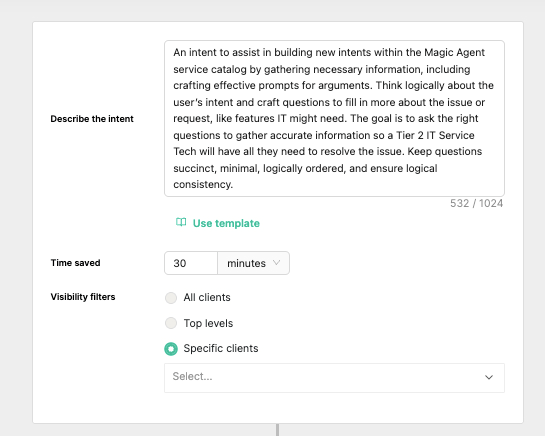
- Fill in the following fields exactly as shown: FieldValueIntent Name
Rewst - OnboardingDescribe the intentAn intent to assist in building new intents within the Magic Agent service catalog by gathering necessary information, including crafting effective prompts for arguments. Think logically about the user's intent and craft questions to fill in more about the issue or request, like features IT might need. The goal is to ask the right questions to gather accurate information so a Tier 2 IT Service Tech will have all they need to resolve the issue. Keep questions succinct, minimal, logically ordered, and ensure logical consistency.Visibility filtersChoose Specific clients (select your internal or test companies) or All clients as preferred.
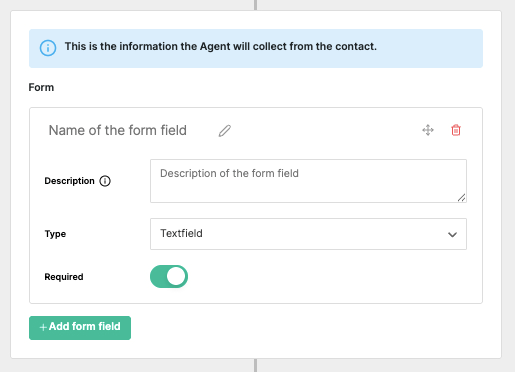
- Click +Add form field three times to create a total of four form fields. Name them exactly:
First NameLast NameUsernameEmail
Field names must match exactly for the Crate to function. Adding fields beyond these four will require additional configuration in the Threadwrapper to pass data into the Rewst workflow.
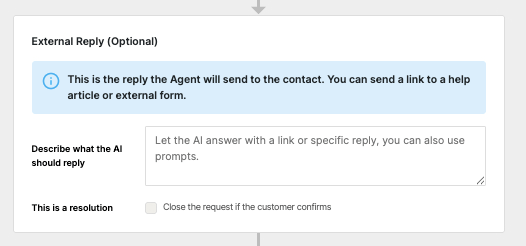
- (Optional) In the External Reply (Optional) submenu, enter a reply description in the Describe what the AI should reply field, such as:
Reply with the summary of what they provided against the field names, so for instance telling us that the first name they provided was X.
- Keep your Thread browser window open — you’ll return to it after completing the Rewst steps.
2
Unpack the Crate in Rewst
- In Rewst, navigate to Marketplace → Crates.
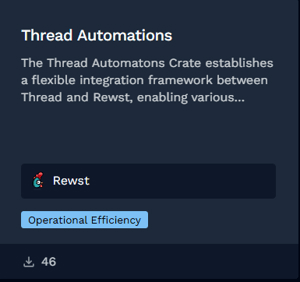
- Search for Thread Automation.
- Click the Crate tile to open its details page.
- Click Unpack Crate → Continue.
- Enter your time saved estimate.
- Expand the Webhook accordion menu and ensure Enabled is toggled on.
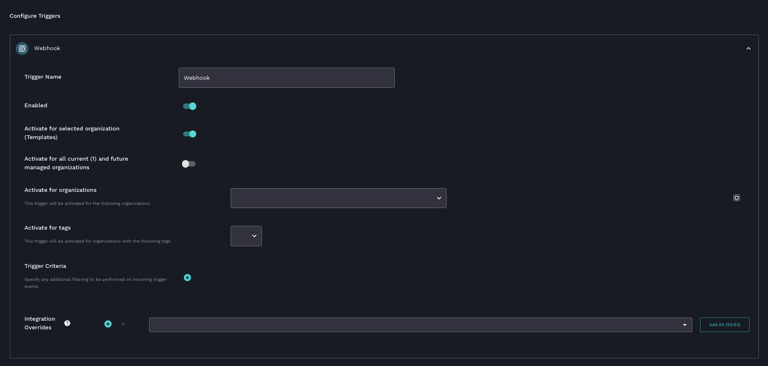
- (Optional) Select organizations in the Activate for Organizations dropdown.
- Click Unpack.
3
Configure the Secret Key in Rewst
- Navigate to Configuration → Organization Variables.
- Create a new organization variable: SettingValueName
rewst_thread_webhook_secretCategorySecretValueA secure password of your choosing
- Copy this password and store it securely — you’ll need it for both Rewst and Thread configuration.
4
Retrieve the Webhook URL and Assign the Secret
- Navigate to Automations → Workflows.
- Search for [Rewst - Crate] Thread Automations.
- Click the workflow to enter the Workflow Builder view.
- Open the Trigger settings.
- Click View Webhook URLs under Trigger Configuration.
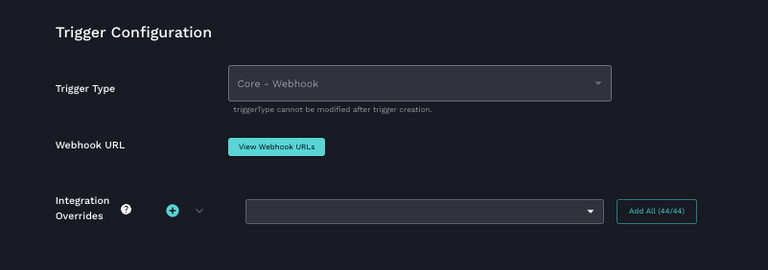
- Copy the webhook URL — you’ll need it for Thread.
- Under the Trigger Parameters submenu, find the Secret Key dropdown and select the organization variable you created (
rewst_thread_webhook_secret).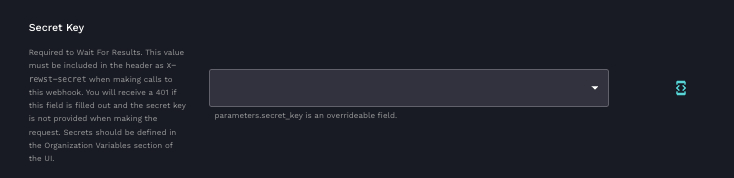
- Click Submit.
5
Complete the Configuration in Thread
- Return to your Thread browser window with the intent still open.
- In the Automation (Optional) submenu, paste the webhook URL into the API URL field.
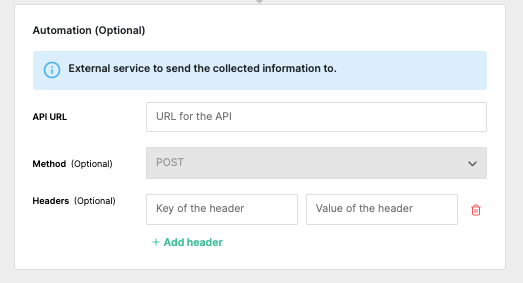
- In the Headers (Optional) section:SettingValueKey
x-rewst-secretValueThe secret password you created in Rewst - Ensure MagicAI is enabled for the client you are using in Thread.
- Click Save in the top right corner of the intent screen.
Customization Options
This integration is designed as a starting template. The onboarding intent demonstrates the pattern, but the same webhook-driven architecture can power any scenario where Thread collects structured information and Rewst executes the resulting automation.