Connect ConnectWise RMM to Super Magic - Beta

Connect ConnectWise RMM (Asio) and Super Magic can look up devices, patch status, tasks, and scripts across your clients, without a technician leaving the thread.
ℹ️ Read-only today. Super Magic's ConnectWise RMM capabilities are lookups — it can find and report on devices, patching, tasks, and scripts, but it does not run or modify anything in RMM yet. Actions will come later and will be confirmation-gated like all Super Magic writes.
How the connection works
- A single workspace connection (admin, once). An admin connects ConnectWise RMM with API client credentials on the integrations page. Super Magic uses that one connection, shared by everyone in the workspace.
- No per-technician sign-in. Technicians do not connect their own RMM accounts.
- Pick your region once. The connection form has a Region selector (US / EU / AU); Thread also recognizes the region from your Client ID.
If RMM tools aren't appearing in chat, it's the workspace connection or the Super Magic toggle — never a per-member sign-in.
Step 1 — Connect ConnectWise RMM to Thread (skip if already connected)
- In ConnectWise RMM (Asio), create API client credentials — you'll get a Client ID and a Client Secret
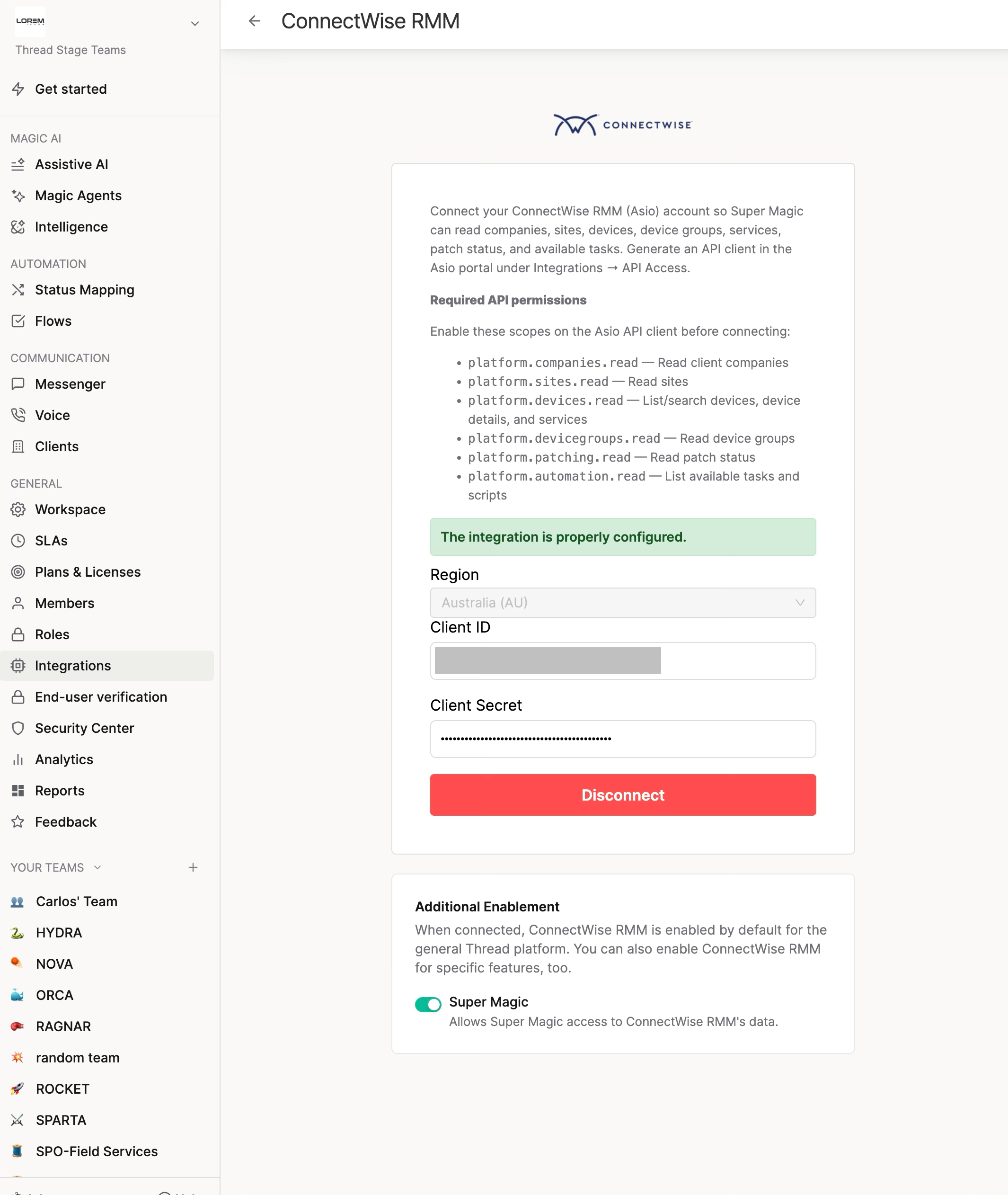
- In Thread Admin → Integrations → ConnectWise RMM, fill in the form:
Field | What goes in it | NOT this |
Client ID | The API client ID from ConnectWise RMM | ❌ your Asio login email |
Client Secret | The API client secret — shown once when created, store it safely | ❌ your Asio password |
- Click Connect. Thread validates the credentials live, so a wrong value fails right here with an error banner.
Step 2 — Turn on Super Magic access
On the same ConnectWise RMM integration page, below the connection form, there's an Additional Enablement card with a Super Magic toggle.
Turn it ON. It is off by default — the RMM connection alone does not give Super Magic access. Your existing RMM integration keeps working exactly as before; Super Magic access is opt-in.
Step 3 — Test it
Open the Inbox → Super Magic → try:
- "List our ConnectWise RMM companies"
- "Search RMM for [computer name]"
- "What's the patch status of [device]?"
Every technician in the workspace can now use the RMM lookups — there is no per-member step.
What Super Magic can do with ConnectWise RMM
Look things up (read):
Capability | What it does |
List companies | Your client organizations in RMM |
List sites | Sites within a company |
List device groups | Device groupings |
Search devices | Find computers by name |
Device detail | Details for a specific machine |
List services | Services on a device |
Patch status | Patching state for a device |
List tasks | Automation tasks |
List scripts | Available scripts |
List shell scripts | Available shell scripts |
Take action (write): not available yet. Super Magic will say so clearly if asked to change something in RMM, and will point the technician to ConnectWise RMM. When actions arrive they will go through the Confirm action card and respect your write-access settings.
Troubleshooting
Symptom | Cause | Fix |
"The configuration is incorrect, check the data is correct" | Client ID or Secret wrong | Re-create the API client credentials in ConnectWise RMM and re-enter them — the Secret is only shown once at creation |
Connection works but no RMM tools in chat | Super Magic toggle off | Turn on the Super Magic toggle under Additional Enablement on the ConnectWise RMM integration page |
Super Magic refuses to run a script / modify a task | Expected — v1 is read-only | Lookups only for now; actions are on the roadmap |
No ConnectWise RMM card on the Integrations page | RMM not available for your workspace | Contact Thread support |
How it compares to our other RMM/doc integrations
Integration | Where you connect | Auth model | Writes? |
ConnectWise RMM | Integrations page | API client ID + secret (workspace-wide) | Not yet — read-only |
ConnectWise Automate | Integrations page | Dedicated API user (workspace-wide) | Yes — confirmation-gated |
ImmyBot | Integrations page | Azure client credentials (workspace-wide) | Not yet — read-only |
NinjaOne | Super Magic settings + per-member Connectors | Per-technician OAuth | Yes — confirmation-gated |
